# Reading Eggs, Fast Phonics, & Reading Eggspress

Reading Eggs (K-Grade 7) focuses on a core phonics and sight-word curriculum, using skills and strategies essential for sustained reading success.

**Fast Phonics** (K-Grade 5) is an online synthetic phonics program that teaches essential phonics skills, including letter‑sound recognition, blending, and spelling. Children explore fun activities, decodable reading books, and meet lovable characters like the Reading Eggs Yeti.

**Reading Eggs** (K-Grade 2) makes learning to read interesting and engaging for kids through engaging online games and activities. Games, songs, golden eggs, and other rewards motivate students to keep exploring and learning as they build foundational literacy skills.

**Reading Eggspress** (Grades 2-7) is designed for older readers and offers a unique, effective learning environment. It focuses on building reading fluency and comprehension, spelling and vocabulary, and writing skills, including grammar and punctuation, in an exciting and relevant way. <span class="markedContent"><span dir="ltr" role="presentation">Teachers can assign a read-aloud activity via Reading Eggspress assignments. Students record themselves reading for one minute in a stress-free environment of their choice. Teachers can then listen to these recordings remotely, assess fluency, and provide personalized, constructive feedback on student performance.</span></span>

<p class="callout warning">This subscription is not available to HCOS Registered students.</p>

<p class="callout danger">Please preview content before using it with your students, especially in Reading Eggspress, as there is secular content. These books are optional and are not required reading. Families are advised to actively check texts to make choices that align with their family’s values.</p>

### Logging In

There are three steps to log in to Reading Eggs, Reading Eggspress, or Fast Phonics. All three will show up on your dashboard.

---

**Step 1:** Contact your support teacher and request login information.

---

**Step 2:** Navigate to [Reading Eggs](https://readingeggs.ca/), select your desired subscription, then select the blue "Login" button in the top-right corner.

![image.png](https://sophie.onlineschool.ca/uploads/images/gallery/2024-06/scaled-1680-/Aj8image.png)

---

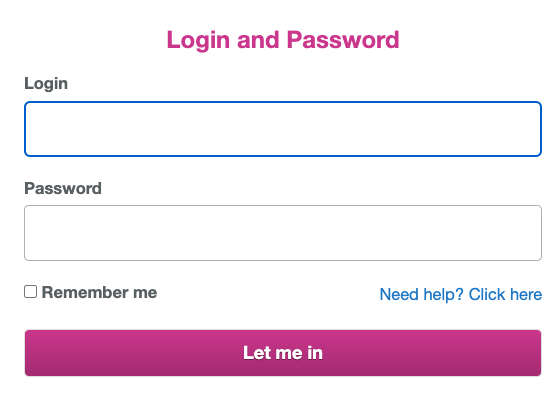
**Step 3:** Enter your login information.
![image.png](https://sophie.onlineschool.ca/uploads/images/gallery/2024-06/scaled-1680-/keoimage.png)

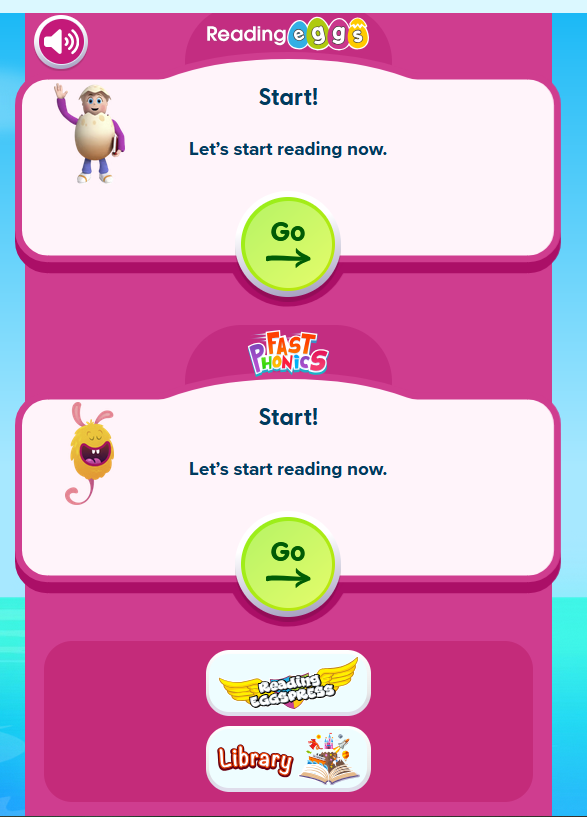
**Step 4:** Choose from your Reading Eggs Dashboard which site you would like to use by selecting the button for Fast Phonics, Reading Eggs or Reading Eggspress.

![image.png](https://sophie.onlineschool.ca/uploads/images/gallery/2025-08/scaled-1680-/jVZimage.png)

### Navigation &amp; Use

<iframe allowfullscreen="allowfullscreen" height="314" src="https://www.youtube.com/embed/Ak_nwieH4A0" width="560"></iframe>

Here is a helpful video on Fast Phonics.

<iframe allow="accelerometer; autoplay; clipboard-write; encrypted-media; gyroscope; picture-in-picture; web-share" allowfullscreen="allowfullscreen" frameborder="0" height="315" src="https://www.youtube.com/embed/zn06_YADc8s?si=A1Yw1y96Hp6VAxKM" title="YouTube video player" width="560"></iframe>

You can also review more [tutorial video content](https://support.3plearning.com/distance-teaching-resources/#reading-eggs) on the Reading Eggs site or try a [sample lesson](https://readingeggspress.com/about/sample-lesson/) in Reading Eggspress.

#### Sight Words

The "Eggy Words" – Sight Words app will help your child recognize and learn the essential sight words that make up a large part of everyday reading. They will do this while playing a fun game that will keep them engaged for many hours. Eggy Words is compatible with iPad, iPhone and Android devices.

There is a free version, Eggy 100, which contains the first 100 sight words, or you can purchase the full version, Eggy 250, which contains the top 250 sight words your child will need to learn. Both apps are available to download on iTunes, Google Play and Amazon.

Search for "Eggy 100" to download [the free Reading Eggs app](https://readingeggspress.ca/apps/eggy_words/) for sight words.

#### Placement Test

New students automatically receive a placement test the first time they log in to Reading Eggs.

To start the placement test, log in [here](https://readingeggs.com/).

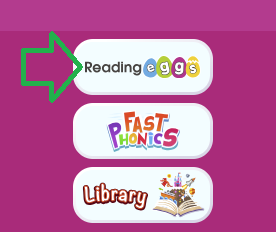
<span class="TextRun SCXO19424466 BCX0" data-contrast="auto" lang="EN" xml:lang="EN"><span class="NormalTextRun SCXO19424466 BCX0">Select the Reading Eggs button on the dashboard to get started.</span></span><span class="EOP SCXO19424466 BCX0"> </span>

<span class="LineBreakBlob BlobObject DragDrop SCXO19424466 BCX0"><span class="SCXO19424466 BCX0"> </span></span>![image.png](https://sophie.onlineschool.ca/uploads/images/gallery/2026-03/scaled-1680-/2SQimage.png)

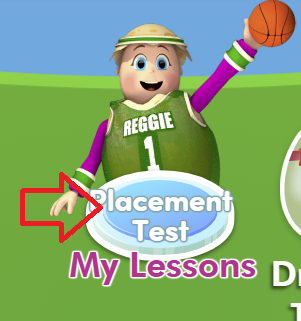
<span class="LineBreakBlob BlobObject DragDrop SCXO19424466 BCX0"><span class="SCXO19424466 BCX0"> </span></span><span class="TextRun SCXO19424466 BCX0" data-contrast="auto" lang="EN" xml:lang="EN"><span class="NormalTextRun SCXO19424466 BCX0">You should see the words "Placement Test" on the "My Lessons" button.</span></span><span class="EOP SCXO19424466 BCX0"> </span>

![image.png](https://sophie.onlineschool.ca/uploads/images/gallery/2026-03/scaled-1680-/Isnimage.png)

Reading Eggs will begin the placement test as soon as your student starts answering questions. The test can include up to 60 questions. It may take a few days to complete if your student answers correctly and works in shorter sessions. The test will automatically end after three incorrect answers.

While your student is taking the test, please avoid giving them the answers. It’s okay to help them understand what the question is asking and how to use the Subscription, but let them choose their own answers.

For the most accurate results, the test should be taken more than once. During the first assessment, part of the process involves learning how to use the program itself. Because of this, students might not answer all questions correctly—not due to their ability, but because they’re still figuring out how it works. As a result, they may be placed at a lower level than they actually belong.

Students can access the placement test at any time by contacting their teacher to reset it.

<span class="LineBreakBlob BlobObject DragDrop SCXO19424466 BCX0"><span class="SCXO19424466 BCX0"> </span></span>[Reading Eggs printable library](https://readingeggs.ca/free-resources/).

[Teacher toolkit](https://readingeggs.ca/schools/teacher-toolkit/)

[Worksheet bundles](https://info.edmentum.com/Volume-2-Worksheet-Bundles_Downloads.html)

If you would like to share your student's reading progress with your support teacher, consider using a voice recorder (e.g., [Vocaroo](https://vocaroo.com/)) and sharing the file.

#### Additional Learning Opportunities in Reading Eggs**<span class="markedContent" id="bkmrk-storylands"></span>**

**<span class="markedContent"><span dir="ltr" role="presentation"><span class="markedContent" id="bkmrk-story-factory-0">Story Factory (Less</span></span></span>**<span class="markedContent">**<span dir="ltr" role="presentation"><span class="markedContent" id="bkmrk-ons">ons</span></span>**<span dir="ltr" role="presentation"><span class="markedContent" id="bkmrk-11%2B%29-invites-student"> **11+)** invites students to p</span></span></span><span dir="ltr" role="presentation"><span id="bkmrk-practice-writing-ski">ractice writing skills and storytelling by creating</span></span><span dir="ltr" role="presentation"><span id="bkmrk-students-to-create-t"> their own storybooks. </span></span><span dir="ltr" role="presentation"><span id="bkmrk-students-can-save-th">Students can save their books to My House f</span></span><span id="bkmrk-for-later-rereading-">or later rereading or submit them to a weekly contest.</span>

**<span dir="ltr" role="presentation"><span id="bkmrk-my-house%2C-reggie%E2%80%99s-s-0">Reggie’s Shop Arcade (Lessons 7+) and My House (Lessons 11+)</span></span>**<span class="markedContent"><span dir="ltr" role="presentation"><span class="markedContent" id="bkmrk-to-motivate-learners"> motivate learners by awarding Golden Eggs</span></span></span><span class="markedContent"><span dir="ltr" role="presentation"><span class="markedContent" id="bkmrk-golden-eggs-to-celeb"> to celebrate their learning achievements. In Reggie’s Shop, students can cash in their Golden Eggs to decorate their house or dress their avatars. In the Arcade, </span></span></span><span class="markedContent"><span dir="ltr" role="presentation"><span class="markedContent" id="bkmrk-students-can-also-sp">students can also spend their Golden Eggs and play educational games.</span></span></span>

**<span class="markedContent"><span dir="ltr" role="presentation"><span class="markedContent" id="bkmrk-spelling-skillsbank">Spelling Skills Bank (Lessons 41+)</span></span></span>**<span class="markedContent"><span dir="ltr" role="presentation"><span class="markedContent" id="bkmrk-build-spelling-skill"> incorporates lessons </span></span></span><span class="markedContent"><span dir="ltr" role="presentation"><span class="markedContent" id="bkmrk-that-test-spelling-s">that test spelling strategies, including word structure, word families, meaning, segmentation, phonics, and repetition to build </span></span></span><span class="markedContent"><span dir="ltr" role="presentation"><span class="markedContent" id="bkmrk-spelling-knowledge.">spelling knowledge.</span></span></span>

**<span class="markedContent"><span dir="ltr" role="presentation"><span class="markedContent" id="bkmrk-puzzle-park">Puzzle Park</span></span></span>**<span class="markedContent"><span dir="ltr" role="presentation"><span class="markedContent" id="bkmrk-%28lessons-41%2B%29-allows"> **(Lessons 41+)** allows students to e</span></span></span><span class="markedContent"><span dir="ltr" role="presentation"><span class="markedContent" id="bkmrk-experience-brain-str">xperience brain-stretching puzzles that reinforce comprehension, high-frequency </span></span></span><span class="markedContent"><span dir="ltr" role="presentation"><span class="markedContent" id="bkmrk-sight-word-knowledge">sight word knowledge, vocabulary development, and problem-solving.</span></span></span><span class="markedContent"><span dir="ltr" role="presentation"><span class="markedContent" id="bkmrk-park."> </span></span></span>

<span class="markedContent"><span dir="ltr" role="presentation"><span class="markedContent" id="bkmrk-driving-tests">**Driving Tests (Lessons 41+)** a</span></span></span><span class="markedContent"><span dir="ltr" role="presentation"><span class="markedContent" id="bkmrk-assess-readingskills">ssess reading skills, including high-frequency sight words, phonics</span></span></span><span class="markedContent"><span dir="ltr" role="presentation"><span class="markedContent" id="bkmrk-skills%2C-and-vocabula">, and vocabulary. Students are rewarded with an exciting racing game for answering questions correctly</span></span></span><span class="markedContent"><span dir="ltr" role="presentation"><span class="markedContent" id="bkmrk-with-an-exciting-rac">.</span></span></span>

<span class="markedContent"><span dir="ltr" role="presentation"><span class="markedContent">**<span class="markedContent" id="bkmrk-storylands-%28lessons--1">Storylands (Lessons 61+) </span>**<span class="markedContent" id="bkmrk-enter-the-land-of-cl">focuses on </span><span class="markedContent" id="bkmrk-expanding-vocabulary">expanding vocabulary and building comprehension skills using activities, levelled texts, </span><span class="markedContent" id="bkmrk-and-a-comprehension-">and a comprehension quiz in each lesson.</span></span></span></span>

<span class="markedContent"><span dir="ltr" role="presentation"><span class="markedContent"><span class="markedContent"><span data-processed="true" data-subtree="aimfl,mfl">**Clinker Castle** **<span class="markedContent" id="bkmrk-%28lessons-61%2B%29">(Lessons 61+)</span>** is a themed Storylands area, designed for early readers to build comprehension and vocabulary. </span> It features 20 interactive lessons and stories centered on a royal family and their pet dragon, offering rewards like golden eggs, avatar items, and map features. </span></span></span></span>

#### Troubleshooting

- Refresh your page.
- Ensure you have a strong internet connection.
- Ensure you access Reading Eggs via the internet address bar and not through shortcuts or bookmarks.
- Delete your browsing history (temporary internet files/cache/cookies), as your computer may continually memorize the same error. Google “clear cache” and choose your browser for instructions.
- Upgrade to [Google Chrome](http://www.google.com/chrome).
- Investigate whether you have a parental lock or anti-virus software blocking the site. Ensure the following URLs are on your safe list:
    
    
    - readingeggs.com
    - readingeggspress.com
    - student.readingeggspress.com