# Mathletics

<span style="font-size: 10.5pt; font-family: Poppins,sans-serif; color: #444444; background-color: #ffffff; font-weight: 400; font-style: normal; font-variant: normal; text-decoration: none; vertical-align: baseline; white-space: pre-wrap;">Mathletics (Gr. K-9) is a supplementary math course that builds confidence through personalized learning, exciting games and mastery challenges. </span>

<p class="callout warning"><span style="font-size: 10.5pt; font-family: Poppins,sans-serif; color: #000000; background-color: #fee3d3; font-weight: 400; font-style: normal; font-variant: normal; text-decoration: none; vertical-align: baseline; white-space: pre-wrap;">This subscription is not available to HCOS Registered students.</span></p>

### Logging In

1. [Log in to Mathletics](http://readingeggs.com/) through the Reading Eggs platform.
2. Use the “Login” button at the top right.

[![image.png](https://sophie.onlineschool.ca/uploads/images/gallery/2025-08/scaled-1680-/ax5image.png)](https://sophie.onlineschool.ca/uploads/images/gallery/2025-08/ax5image.png)

3. Enter the username and password that you received from your teacher.

<span style="font-size: 10.5pt; font-family: Poppins,sans-serif; color: #000000; background-color: #ffffff; font-weight: 400; font-style: normal; font-variant: normal; text-decoration: none; vertical-align: baseline; white-space: pre-wrap;"><span style="border: none; display: inline-block; overflow: hidden; width: 332px; height: 242px;">![](https://lh7-rt.googleusercontent.com/docsz/AD_4nXfgSMKhdLWJTzNcBy-No31FG_iBZF8k4G_GjHRGT24AozRZY5JlreKJtHJ8_XQHemW7_qNNsYLx9hkoWaphPuyG5f6wPRJIyaz7Z28HibgPIQJz0JirWxooEkOn_ia8x1LK19NefA?key=R4CNovqbc53GbX7ISLj4eA)</span></span>

### Navigation and Use

<iframe allowfullscreen="allowfullscreen" height="314" src="https://www.youtube.com/embed/1nGtoogtiHQ" width="560"></iframe>

<span style="font-size: 12pt; font-family: Poppins,sans-serif; color: #000000; background-color: #ffffff; font-weight: 400; font-style: normal; font-variant: normal; text-decoration: none; vertical-align: baseline; white-space: pre-wrap;">Here is</span>[<span style="font-size: 12pt; font-family: Poppins,sans-serif; color: #000000; background-color: #ffffff; font-weight: 400; font-style: normal; font-variant: normal; text-decoration: none; vertical-align: baseline; white-space: pre-wrap;"> </span><span style="font-size: 12pt; font-family: Poppins,sans-serif; color: #1155cc; background-color: #ffffff; font-weight: 400; font-style: normal; font-variant: normal; text-decoration: underline; -webkit-text-decoration-skip: none; text-decoration-skip-ink: none; vertical-align: baseline; white-space: pre-wrap;">The Family User Guide For Mathletics.</span>](https://drive.google.com/file/d/1mF5qGuIlGLaBD3DInAxlZW831KRBB5oS/view?usp=sharing)

<span style="font-size: 12pt; font-family: Poppins,sans-serif; color: #000000; background-color: #ffffff; font-weight: 400; font-style: normal; font-variant: normal; text-decoration: none; vertical-align: baseline; white-space: pre-wrap;">Short Mathletics </span>[<span style="font-size: 12pt; font-family: Poppins,sans-serif; color: #1155cc; background-color: #ffffff; font-weight: 400; font-style: normal; font-variant: normal; text-decoration: underline; -webkit-text-decoration-skip: none; text-decoration-skip-ink: none; vertical-align: baseline; white-space: pre-wrap;">information video</span>](https://fast.wistia.com/embed/medias/kvotn0qidw)<span style="font-size: 12pt; font-family: Poppins,sans-serif; color: #000000; background-color: #ffffff; font-weight: 400; font-style: normal; font-variant: normal; text-decoration: none; vertical-align: baseline; white-space: pre-wrap;"> for parents.</span>

<span style="font-size: 12pt; font-family: Poppins,sans-serif; color: #000000; background-color: #ffffff; font-weight: 400; font-style: normal; font-variant: normal; text-decoration: none; vertical-align: baseline; white-space: pre-wrap;">Download your </span>[<span style="font-size: 12pt; font-family: Poppins,sans-serif; color: #1155cc; background-color: #ffffff; font-weight: 400; font-style: normal; font-variant: normal; text-decoration: underline; -webkit-text-decoration-skip: none; text-decoration-skip-ink: none; vertical-align: baseline; white-space: pre-wrap;">Parent Pack</span>](https://www.mathletics.com/ca/parent-portal/parent-pack/)<span style="font-size: 12pt; font-family: Poppins,sans-serif; color: #000000; background-color: #ffffff; font-weight: 400; font-style: normal; font-variant: normal; text-decoration: none; vertical-align: baseline; white-space: pre-wrap;"> for all the information you need.</span>

#### Parent Account

<span style="font-size: 12pt; font-family: Poppins,sans-serif; color: #000000; background-color: #ffffff; font-weight: 400; font-style: normal; font-variant: normal; text-decoration: none; vertical-align: baseline; white-space: pre-wrap;">1. Sign up for the </span>[<span style="font-size: 12pt; font-family: Poppins,sans-serif; color: #1155cc; background-color: #ffffff; font-weight: 400; font-style: normal; font-variant: normal; text-decoration: underline; -webkit-text-decoration-skip: none; text-decoration-skip-ink: none; vertical-align: baseline; white-space: pre-wrap;">Weekly Parent Report.</span>](https://weeklyreport.prod.eastus2.mathletics.com/signup)

<span style="font-size: 10.5pt; font-family: Poppins,sans-serif; color: #000000; background-color: #ffffff; font-weight: 400; font-style: normal; font-variant: normal; text-decoration: none; vertical-align: baseline; white-space: pre-wrap;"><span style="border: none; display: inline-block; overflow: hidden; width: 233px; height: 389px;">![](https://lh7-rt.googleusercontent.com/docsz/AD_4nXcZ_Ykp_pWmJgkAxfN6o2IzLaWx0OL6NEO_2sNtnnIKXn0alejdrhBigQqE0xPelT9FMNZUqqYZoMaPsQeR9s8rP4_lLJfaIoxfB99Ol4_zDaoigcNMkdnFSSOFEd3S91AFreX8Sg?key=R4CNovqbc53GbX7ISLj4eA)</span></span>

<span style="font-size: 10.5pt; font-family: Poppins,sans-serif; color: #000000; background-color: #ffffff; font-weight: 400; font-style: normal; font-variant: normal; text-decoration: none; vertical-align: baseline; white-space: pre-wrap;">2. This will generate a page that has a button that will take you to the parent portal.</span>

<span style="font-size: 10.5pt; font-family: Poppins,sans-serif; color: #000000; background-color: #ffffff; font-weight: 400; font-style: normal; font-variant: normal; text-decoration: none; vertical-align: baseline; white-space: pre-wrap;"><span style="border: none; display: inline-block; overflow: hidden; width: 240px; height: 328px;">![](https://lh7-rt.googleusercontent.com/docsz/AD_4nXeyigRDfXNQms79y-0fCHPOImMq9tkhRWou-XQtITxbLBTQOqzu4UwWkW2mPLihafzJGamtzYJ2aYm8k2Yrsl6ciL39CHJsYgpDMMSvg2Xm-yCi49M0nxxiyXJwzR7RMXsd8AU9ww?key=R4CNovqbc53GbX7ISLj4eA)</span></span>

<span style="font-size: 10.5pt; font-family: Poppins,sans-serif; color: #000000; background-color: #ffffff; font-weight: 400; font-style: normal; font-variant: normal; text-decoration: none; vertical-align: baseline; white-space: pre-wrap;">3. Use the “Forgot Password” button to set up your password.</span>

<span style="font-size: 10.5pt; font-family: Poppins,sans-serif; color: #000000; background-color: #ffffff; font-weight: 400; font-style: normal; font-variant: normal; text-decoration: none; vertical-align: baseline; white-space: pre-wrap;"><span style="border: none; display: inline-block; overflow: hidden; width: 302px; height: 281px;">![](https://lh7-rt.googleusercontent.com/docsz/AD_4nXeTrGIPKrZL4Trg87tebZlCp2eSFde29Q8Rn-CsiBu0L0WwRYoRdzL6tA2ikJR4zvErsN9ylTGiUJopHRZ4OP8J9D6gv3CyDq2BF3M_Vmwm39-J3roBCr7ZkA9VN0c2jzp17vKQpw?key=R4CNovqbc53GbX7ISLj4eA)</span></span>

<span style="font-size: 10.5pt; font-family: Poppins,sans-serif; color: #000000; background-color: #ffffff; font-weight: 400; font-style: normal; font-variant: normal; text-decoration: none; vertical-align: baseline; white-space: pre-wrap;">4. Verify your email address by selecting the button in the email that they have sent to you.</span>

<span style="font-size: 10.5pt; font-family: Poppins,sans-serif; color: #000000; background-color: #ffffff; font-weight: 400; font-style: normal; font-variant: normal; text-decoration: none; vertical-align: baseline; white-space: pre-wrap;">5. Log in to the </span>[<span style="font-size: 10.5pt; font-family: Poppins,sans-serif; color: #1155cc; background-color: #ffffff; font-weight: 400; font-style: normal; font-variant: normal; text-decoration: underline; -webkit-text-decoration-skip: none; text-decoration-skip-ink: none; vertical-align: baseline; white-space: pre-wrap;">Parent Portal.</span>](https://www.mathletics.com/ca/parent-portal/)

<span style="font-size: 10.5pt; font-family: Poppins,sans-serif; color: #000000; background-color: #ffffff; font-weight: 400; font-style: normal; font-variant: normal; text-decoration: none; vertical-align: baseline; white-space: pre-wrap;"><span style="border: none; display: inline-block; overflow: hidden; width: 334px; height: 312px;">![](https://lh7-rt.googleusercontent.com/docsz/AD_4nXfWXdbMmElUjp-0ZlOdSGsqoXy5QYHhxDBkGwJai4pK6N0o5dROEby1SDTs6zPdRqcLLq6ONEunNiVMeI-GjGLXoNmxcuaUDQ_LuCS_5McsFDM7QmC0RnjLx7BfuvT1Kvx71CGaSQ?key=R4CNovqbc53GbX7ISLj4eA)</span></span>

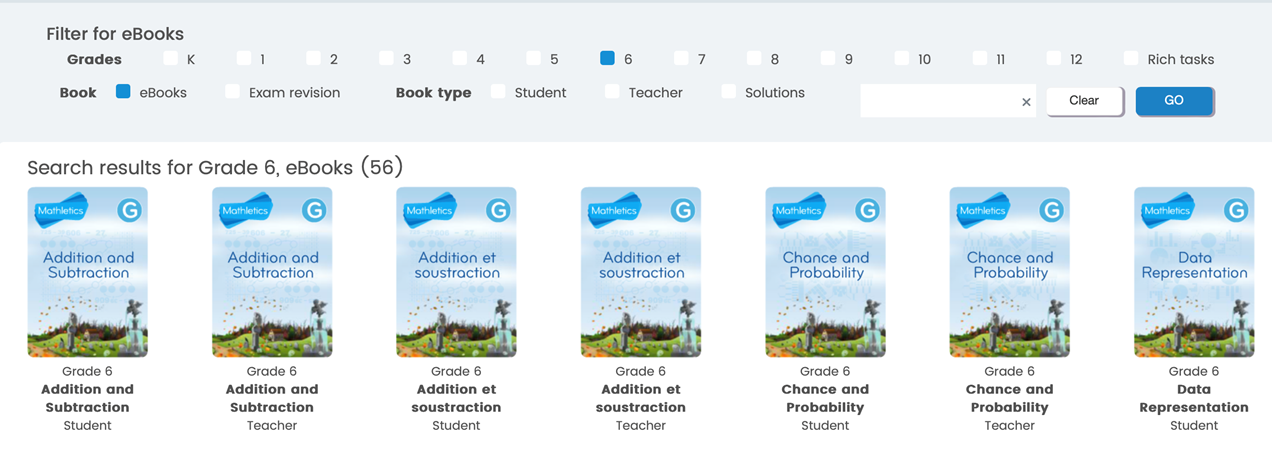
#### Download workbooks for students or teachers [here.](https://www.mathletics.com/uk/resources/fun-engaging-student-workbooks/success/)

[![image.png](https://sophie.onlineschool.ca/uploads/images/gallery/2024-09/scaled-1680-/W08image.png)](https://sophie.onlineschool.ca/uploads/images/gallery/2024-09/W08image.png)
#### Learning the Times Tables

Yes, <span data-processed="true">Mathletics</span> teaches the times tables through various methods, including a space-themed game called [Multiverse](https://www.google.com/search?q=Multiverse&rlz=1C1UEAD_enCA1176CA1176&oq=does+mathletics+teach+the+times+tables&gs_lcrp=EgZjaHJvbWUyBggAEEUYOTIHCAEQIRifBTIHCAIQIRifBTIHCAMQIRifBTIHCAQQIRifBdIBCjEwMjYwajBqMTWoAgiwAgHxBUZuw6ebiVhi&sourceid=chrome&ie=UTF-8&safe=active&ssui=on&mstk=AUtExfBD9Gpl2cBy3EQFKnnDY1MN3YfT3Y_bB4Gvg2kHELGMBe-Ozb0WCt4x7V2qbJ8xz7DeCW-l0uxAutrOEqL-vzgrNDVMNlI7Koj8w3O_erbuCOw9WlnSXlvhzlAgHXLaCRMc1InKVysVllIXtncx9Wc7LVAR8YT1KCCQ1uJ78Jl_lsQ&csui=3&ved=2ahUKEwjQh67Pq-CQAxUSDzQIHSJPEQkQgK4QegQIARAE), interactive activities, and printable worksheets. It utilizes a combination of engaging content, such as the **Multiverse game**, curriculum-based activities, real-time challenges, and practice materials, to help students master multiplication facts.<span class="uJ19be notranslate" data-processed="true" data-wiz-uids="L4GHHc_g,L4GHHc_h"><span class="vKEkVd" data-animation-atomic="" data-processed="true"> </span></span>

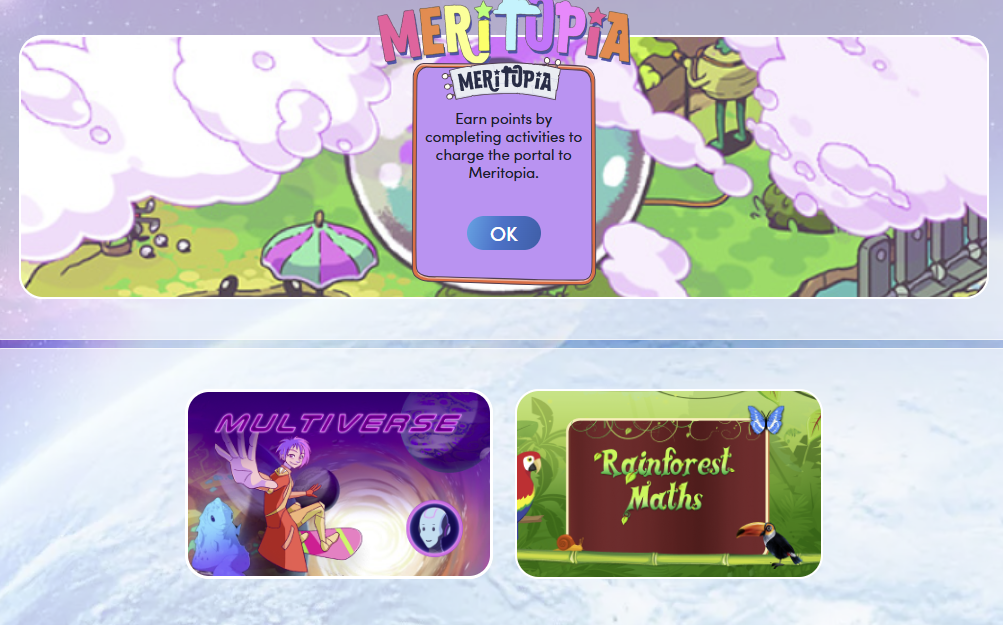
<span class="uJ19be notranslate" data-processed="true" data-wiz-uids="L4GHHc_g,L4GHHc_h"><span class="vKEkVd" data-animation-atomic="" data-processed="true">When a student is logged in, select the "Games" button from the top menu bar.</span></span>

[![image.png](https://sophie.onlineschool.ca/uploads/images/gallery/2025-11/scaled-1680-/image.png)](https://sophie.onlineschool.ca/uploads/images/gallery/2025-11/image.png)

Choose the "Multiverse" button to allow the student to play a space game using the times tables.

[![image.png](https://sophie.onlineschool.ca/uploads/images/gallery/2025-11/scaled-1680-/BmRimage.png)](https://sophie.onlineschool.ca/uploads/images/gallery/2025-11/BmRimage.png)
Times Table Review can also be found in the downloadable workbooks accessed through the parent account described above, starting in Grade 3 with "Multiplication and Division."
