# BC ExamBank

BC ExamBank (K-Grade 12) provides BC curriculum-aligned online practice exams with instant feedback and randomly generated questions for repeated test preparation.

### Logging In

<span style="font-size: 11pt; font-family: Arial,sans-serif; color: #000000; background-color: transparent; font-weight: 400; font-style: normal; font-variant: normal; text-decoration: none; vertical-align: baseline; white-space: pre-wrap;">There are four steps to log in to the BC ExamBank. </span>

---

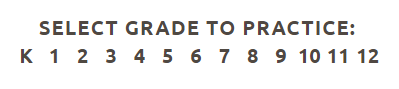
**Step 1:** Navigate to [BC ExamBank](https://bc.exambank.com/).<span style="font-size: 11pt; font-family: Arial,sans-serif; color: #000000; background-color: transparent; font-weight: 400; font-style: normal; font-variant: normal; text-decoration: none; vertical-align: baseline; white-space: pre-wrap;"> <span style="font-size: 11pt; font-family: Arial,sans-serif; color: #000000; background-color: transparent; font-weight: 400; font-style: normal; font-variant: normal; text-decoration: none; vertical-align: baseline; white-space: pre-wrap;">Do not log in at the top of the page. </span>Select the grade you would like to practice.</span>
<span style="font-size: 11pt; font-family: Arial,sans-serif; color: #ff0000; background-color: transparent; font-weight: 400; font-style: normal; font-variant: normal; text-decoration: none; vertical-align: baseline; white-space: pre-wrap;"> </span><span style="font-size: 10.5pt; font-family: Poppins,sans-serif; color: #444444; background-color: #ffffff; font-weight: 400; font-style: normal; font-variant: normal; text-decoration: none; vertical-align: baseline; white-space: pre-wrap;"><span style="border: none; display: inline-block; overflow: hidden; width: 328px; height: 73px;">![](https://lh7-us.googleusercontent.com/OZAAYJmK1KvqIRvMJ7SNJZ7WaUCkeMze-Xq2u8e9y2h1i-8OfKM05yP_H9VTEhSZT8si4t5PfP7B3SbZPbAzRKvHA0FhtE08nULOLLhvO8znrSBKiloUn6LdW0O2Ox5mdok5KEQkcxJTF1iVN88tBtU)</span></span>

---

**Step 2:** Select the subject area.

<span style="font-size: 10.5pt; font-family: Poppins,sans-serif; color: #444444; background-color: #ffffff; font-weight: 400; font-style: normal; font-variant: normal; text-decoration: none; vertical-align: baseline; white-space: pre-wrap;"><span style="border: none; display: inline-block; overflow: hidden; width: 623px; height: 84px;">![](https://lh7-us.googleusercontent.com/-4csblGmD0q6IhAFNp8at9nTAtGMlrDqd_0_uVCNkWpSXZjfkITCubZB5fBY9dz1txS6niTXzNFZHHFI-YeD9wGrT1Ex9oxEMMPC346-QoDV884XYCkMWT5FIWe-bzzlLRnR-7Lb_BKd7bItYLVeSSI)</span></span>

---

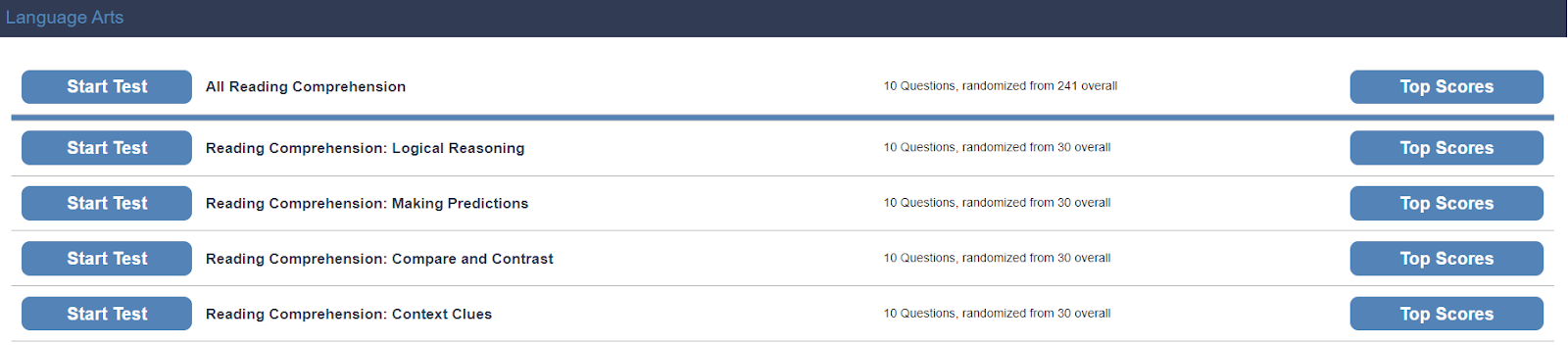
**Step 3:** Select the test that you wish to take.
<span style="font-size: 10.5pt; font-family: Poppins,sans-serif; color: #444444; background-color: #ffffff; font-weight: 400; font-style: normal; font-variant: normal; text-decoration: none; vertical-align: baseline; white-space: pre-wrap;"><span style="border: none; display: inline-block; overflow: hidden; width: 624px; height: 137px;">![](https://lh7-us.googleusercontent.com/9wH-6CRyXe-lNXqFYoUbEIS7ZqLZW3AIh_4nHDOZME4y9NOQnzhHQhAdO7hqpz-GsNcsypNYgO7m3IdZuZbslhjlJcehGwobyQ9nOlKEfEEhR9vyBbd4crdH6FTq_chxgTaUiCPLXaxsuUOPjx9Mh9c)</span></span>

---

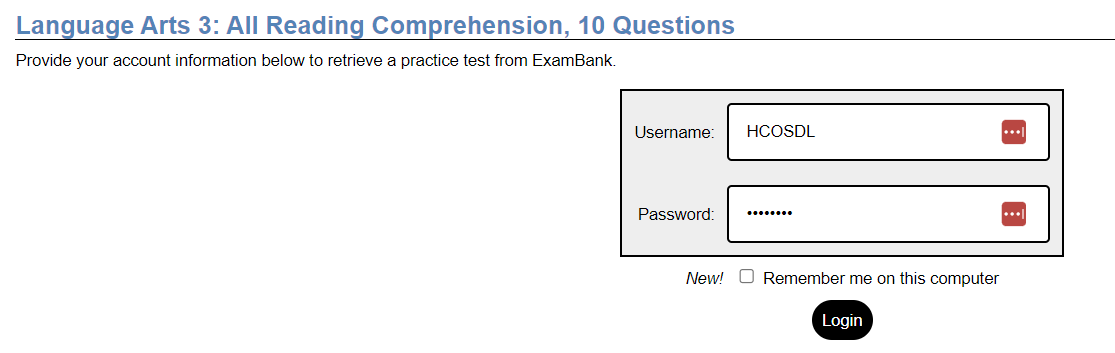
**Step 4:** Enter the username and password for BC ExamBank from the Subs/Passwords tab in the [Search Portal](https://hcs.insigniails.com/LibrarySAML/Home).
<span style="font-size: 10.5pt; font-family: Poppins,sans-serif; color: #444444; background-color: #ffffff; font-weight: 400; font-style: normal; font-variant: normal; text-decoration: none; vertical-align: baseline; white-space: pre-wrap;"><span style="border: none; display: inline-block; overflow: hidden; width: 624px; height: 197px;">![](https://lh7-us.googleusercontent.com/Bc2401WK2WC5bQte07DMWylTq1mxyS6vTsIp_bCIyyhKlZzeYzmE6MLldSbeIIzWmRHd3FqThuh7hjWPC6Yb61Ry4U2ugZGGxGtEttrG5ECh-0UiVcW8_V8_gFmUTraHjod6nOnS0gygPLJZxqXGyUc)</span></span>

### <span style="font-weight: normal;">Navigation &amp; Use</span>

<span style="font-weight: normal;">Watch this short video to learn more about how students can use the BC ExamBank site.</span>

<iframe allow="accelerometer; autoplay; clipboard-write; encrypted-media; gyroscope; picture-in-picture; web-share" allowfullscreen="allowfullscreen" frameborder="0" height="315" src="https://www.youtube.com/embed/moyCYTv3DoA?si=1y8EjgqVW3JsPlGB" title="YouTube video player" width="560"></iframe>

<p class="callout info">If you cannot access tests when clicking the "Start test" button, you likely have a pop-up window blocker installed on your computer. Please add bc.exambank.com to your pop-up blocker's trusted sites list.</p>

BC ExamBank immediately generates the answers for the student when the student selects "submit" at the end of the test. Test results explain how to find the correct answers. This gives a student a jump-start in understanding questions that they answered incorrectly.

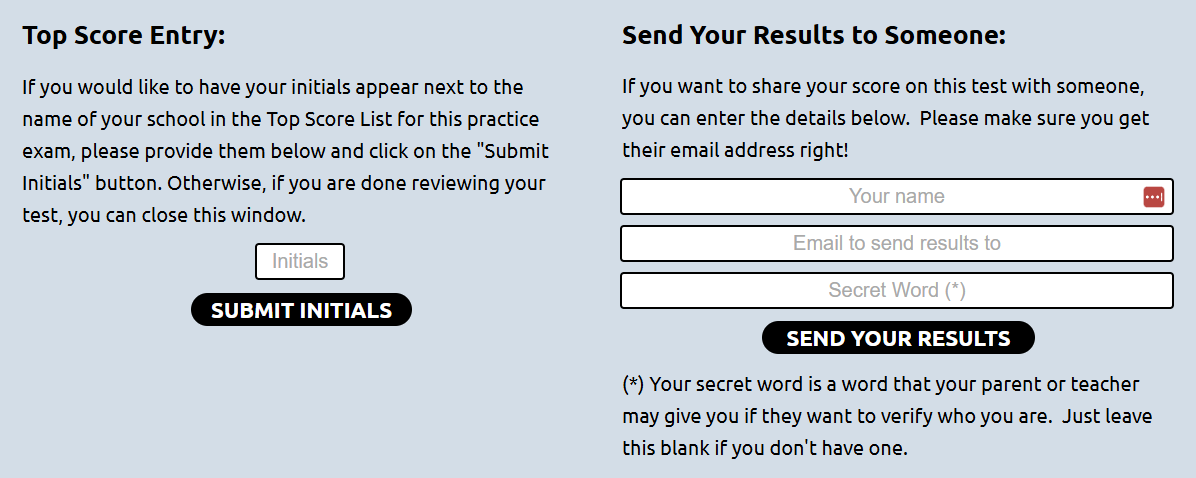
Once a test is completed, students can send results to their support teacher by scrolling to the bottom of the page and filling out the following form.

<span id="bkmrk--16" style="font-weight: normal;"><span style="font-size: 10pt; font-family: Poppins, sans-serif; font-weight: 400; font-style: normal; font-variant: normal; white-space-collapse: preserve;"><span style="border-width: initial; border-style: none; display: inline-block; overflow: hidden; width: 500px; height: 203px;">![](https://lh7-us.googleusercontent.com/Ho-gjyxFGpQTT3TVjJOPMR5qyZOJnYqwT_sgcX4V1-oA8Q0szGkgx91hcerRg8sws9bb8sq2FQnEOiGVrD3-Zzlrsi_GCxyosUpZywEh1uoHkSwjXWJSTXuC5pEZm2LaNfDm3fvd_zBiYvxmslsEuF0)</span></span></span>

#### Printing Exams

If you print copies of an exam, your use is limited to a period of 10 months from the date that the exam is printed. Enter the exam you wish to print. Click and drag to highlight the exam. Right-click on the text and select "print."