# Encom Access & Icon Explanation

<div data-block="true" data-editor="2mo5l" data-offset-key="beq3j-0-0" id="bkmrk-"></div><div data-block="true" data-editor="2mo5l" data-offset-key="f02ho-0-0" id="bkmrk-encom-is-a-database-"><div data-offset-key="f02ho-0-0">Encom is a database in which student records and reports are stored. This can be considered to be the ‘office’ area of the school and it is separate from the site in which the online courses are posted, which is called Brightspace. You can login [here](https://hcos.onlinelearningbc.com/d2l/login). </div><div data-offset-key="f02ho-0-0">  
</div><div data-offset-key="f02ho-0-0">- <span data-offset-key="6cv1o-0-0">In Encom, the following is visible for each student: </span>
- <span data-offset-key="6cv1o-0-0">Basic information (address, phone numbers etc.</span>
- <span data-offset-key="6cv1o-0-0">Course list, student learning plans (SLP) for Individualized subjects</span>
- <span data-offset-key="6cv1o-0-0">Resource budget information</span>
- <span data-offset-key="6cv1o-0-0">Report cards</span>

</div></div><span data-offset-key="6cv1o-0-0">Any errors in information can be shared with your support teacher or directed to the Flex Office at info@flex.academy.</span>

<div data-block="true" data-editor="2mo5l" data-offset-key="f02ho-0-0" id="bkmrk--1"><div data-offset-key="f02ho-0-0"></div><div data-offset-key="f02ho-0-0">  
</div></div>When a student is enrolled, parents/guardians are emailed a User Name and Password for Encom. Please save this information and be sure to record it **<u>exactly</u>** as it is sent so it can be found easily when needed to access Encom.

<p class="callout info">**To access Encom, go to [https://encom.onlineschool.ca/](https://encom.onlineschool.ca/ "www.onlineschool.ca")**</p>

<p class="callout info">**If you forget your username and/or password please contact [Tech Support](mailto:tickets@onlineschool.ca)**</p>

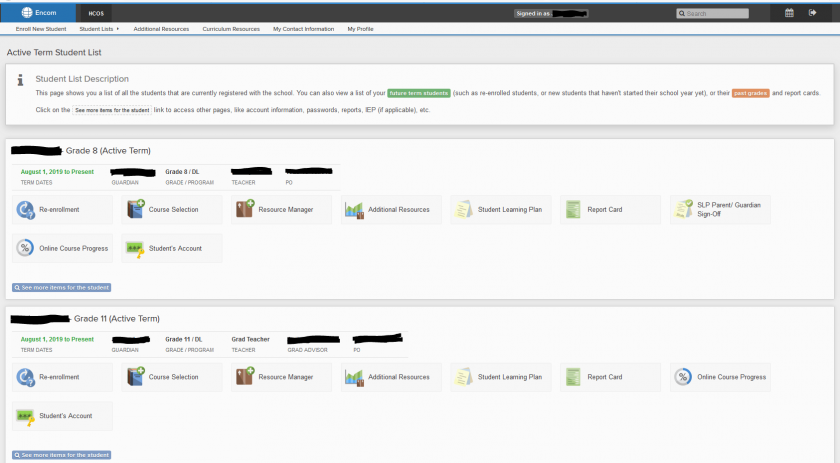
When you access Encom, this is approximately what you will see. Please take the time to become familiar with the various components of Encom***.***
![](https://sophie.onlineschool.ca/uploads/images/gallery/2020-03-Mar/scaled-840-0/image-1583345779053.png)

### The Main Icons Used by Parents/Guardians
 ![](https://sophie.onlineschool.ca/uploads/images/gallery/2020-03-Mar/scaled-840-0/image-1583346842049.png)

**Additional Resources** – This icon is where information related to the curriculum budget is tracked. Please check the curriculum budget before making purchases with the Purchase Order number to ensure there are enough funds for the purchase.

![](https://sophie.onlineschool.ca/uploads/images/gallery/2020-03-Mar/scaled-840-0/image-1583347188663.png)

The **Report Card** links directly to each student's report card. If there are any difficulties viewing it, please contact the Support Teacher and they can help.

![](https://sophie.onlineschool.ca/uploads/images/gallery/2020-03-Mar/scaled-840-0/image-1583347336533.png)

The **Self-Assessment Survey** is completed annually for each student and can be done in combination with the support teacher, student, and parent/guardian. Typically, Support Teachers share information related to this and guide parents through the process.

![](https://sophie.onlineschool.ca/uploads/images/gallery/2020-03-Mar/scaled-840-0/image-1583346222096.png) ![](https://sophie.onlineschool.ca/uploads/images/gallery/2020-03-Mar/scaled-840-0/image-1583346265836.png)

Select **See more items for the student** to access the student **Contact Information** to ensure it's up to date or when it needs to be changed. To see parent/guardian email and other contact information, click on the name above **Guardian** on the main page in Encom. The Flex Office should be notified of any changes as well at <span data-offset-key="6cv1o-0-0"><info@flex.academy></span>.