Grad Program
- Career Life Education & Career Life Connections Courses
- Comparative Civilizations Program (with Overseas Travel)
- Course Options
- Dual Credits
- Exams
- Flex Academy Graduation Certificate
- Grad Planner - FAQ
- Math Course Options and Streams
- The Role of the Academic Advisor
- Part-Time Enrollment At Flex Academy
- Transitioning from Grade 9
- Viewing Graduation Assessment Results and Your Transcript
Career Life Education & Career Life Connections Courses
This page is designed to outline the differences in the Career Life Education (CLE) and Career Life Connections (CLC) offerings at HCOS.
Career Life Education should be taken before Career Life Connections.
The Ministry of Education has outlined the rationale and goals for the new K-12 Career Education offerings:
Rationale
Today’s graduates must be able to adapt to ongoing change in many aspects of their lives. For most people, career life planning will not be a matter of making one major decision and living with it for a lifetime. Instead, purposeful career-life development, where students learn how to set personally meaningful goals, recognize and cultivate relevant opportunities and supportive relationships, and continually re-evaluate and revise their plans, is a requirement for educated citizens in an ever-changing world.
Educated citizens are lifelong learners who continually build on their self-awareness about evolving interests and strengths, and who are able to use this personal knowledge to inform their career-life choices with flexibility as opportunities and challenges arise. Career Education fosters development of the confidence, knowledge, and competencies necessary to succeed in personal, educational, and workplace contexts throughout life.
From Kindergarten to graduation, the Career Education curriculum offers students many opportunities to explore and develop personal interests, strengths, and competencies while making connections with experiential learning, career life possibilities, and preferred post-graduation opportunities. Under the guidance of their teachers, students discover that career life development with intent is not simply figuring out what they want to be when they grow up, but a lifelong journey of being and becoming who they want to be in the world and how they can make meaningful contributions in their communities.
Career Education includes reflection on learning experiences both in school and out of school, and facilitates connections with communities and networks to support personal career-life interests and goals. The Career Education curriculum aligns with the First Peoples Principles of Learning, highlighting a holistic view of students placed at the centre of their learning, and recognizing the importance of experiential learning, guidance from mentors, and community involvement.
Goals
The Career Education curriculum contributes to students’ development as educated citizens by achieving the following goals. Students are expected to:
- recognize the need to be adaptable, resilient, and flexible in order to meet the ever-changing opportunities and challenges of today’s world
- understand how ongoing purposeful career life development contributes to the success and well-being of individuals, communities, and society
- build personal career life development capacity to effectively learn and grow new interests, knowledge, skills, and competencies throughout their lives
- develop awareness of their personal strengths, competencies, values, and passions, and use this self-knowledge to inform career life choices
- communicate and interact collaboratively with others, valuing diversity of people, perspectives, worldviews, ideas, and opportunities
- explore a range of experiences, roles, and opportunities in personal, educational, and workplace contexts to advance their personal career-life journeys
Flex Academy Grad Program Offerings
- Students must complete Career Life Education and Career Life Connections before graduating. You only have to complete the course once!
- Career Life Education should be completed prior to taking Career Life Connections.
- Career Life Connections culminates with a student Capstone presentation.
Flex offers both Career Life courses as Hybrid courses. Please connect with your Grad Advisor to plan the best time for you to take these as well as which course option is best for you!
Comparative Civilizations Program (with Overseas Travel)
Flex Academy Grad students can cross-enroll with HCOS if they would like to participate in the Comparative Civilizations Program (in years it is running). See this page for more information on this opportunity.
Course Options
Flex Academy offers the ability to design a unique high school experience with a variety of different learning options. All courses provide credit towards the BC Dogwood Diploma.
Hybrid Courses
Flex Academy offers blended courses at the grad level in multiple subject areas. For each blended course, course content and unit lessons are hosted in BrightSpace for students to complete on a flexible schedule throughout their week. Students then participate in weekly learning labs where they engage in high-engagement hands-on activities to support the subject area's learning. Flex hybrid courses run the length of the school year with the support of a Flex Academy subject specialist teacher.
Online Courses
Flex Academy offers Grad Students the ability to cross-enroll with HCOS to access an impressive online course catalogue that provides engaging online learning.
HCOS offers two flexible pacing options:
- Asynchronous: work at your own pace to complete the course within twelve months from activation date.
- Synchronous cohorts: work at the same pace as your peers, meeting regularly on Zoom with your online teacher.
If available, Flex Students should take the Flex Academy Blended course instead of the same HCOS synchronous online course. Please talk to your Grad advisor or the Director of Flex Academy if you have any questions.
Dual Credits
The Ministry of Education and Child Care has provided an option for students to be involved in dual credit programs where they enrol in and complete post-secondary courses or training, and also earn secondary (high school) credits at the same time. These dual-credit programs are stand-alone agreements set up between a specific secondary school and a specific post-secondary institution, usually within the same school district.
Flex Academy does not currently offer dual credit course offerings for our Grade 10-12 students. Students interested in dual-credit courses are encouraged to explore options for cross-enrolment with a local secondary school, and your grad advisor is happy to help you create a schedule and plan for graduation that includes any information on local dual-credit options you bring to them.
For more information on Dual Credits, please visit the Ministry of Education website.
Exams
Flex Academy grad teachers will walk students through the process for scheduling exams for any Flex courses that have an exam component.
Course-specific exams will be scheduled during mid-year and year end assessment periods.
Flex Academy schedules the required Government Assessments in collaboration with HCOS, and as per the Ministry of Education and Child Care timelines. See Provincial Assessments - Literacy and Numeracy for details.
Flex Academy Graduation Certificate
This page outlines the requirements needed to receive a Flex Graduation Certificate on top of a student's BC Dogwood Diploma.
Students who complete the BC Graduation requirements receive a BC Dogwood Diploma. HCOS students who complete a minimum of 8 credits in Christian Studies programming also receive an HCOS Graduation Certificate. These 8 credits can be earned through:
- Christian Studies (offered in-person at Flex).
- Specific course programming can include cross-enrolled options like Adventure Discipleship, Humanities and Comparative Civilizations Travel Program.
These 8 credits also satisfy elective requirements for a student's BC Dogwood.
Why a Flex Academy Graduation Certificate?
Often we are asked what is the purpose to working towards this certificate? There are a few beneficial reasons we suggest to all students to take Christian Studies courses with us.
- Faith Development - We are a Christian school and as such believe that our students should continue to be learning and growing in their personal faith journey.
- Our Christian Studies courses help equip students for their future by ensuring they have a strong foundation and can clearly articulate their beliefs.
- Courses are designed to encourage personal development for students as articulated in the HCOS Learner Profile.
- The certificate has been helpful to students applying to Post Secondary studies at Bible Colleges, YWAM programs and universities such as Trinity Western. Showing completion of some under graduate studies in the field they are pursuing can help with entrance requirements.
Grad Planner - FAQ
What is the purpose of the Grad Planner?
As students complete Grades 10-12 in British Columbia, they begin building their transcript and accumulating credits towards a diploma. The Grad Planner module in Encom is used for planning and tracking student progress through the various graduation requirements in BC.
The Grad Planner seen in Encom reflects the graduation program a student is currently enrolled in, either Dogwood, Adult Graduation or School Completion Certificate. It is meant to be a simple tool used to understand graduation requirements and a student’s current standing at any point in time.
Who sets up the Grad Planner?
When a student first connects with their Grad Advisor (GA) and prepares to enter the grad program at Flex, the GA will initiate the set-up of the Grad Planner. If you think your Grad Planner still needs to be set up, please contact your GA.
When a GA initially sets up a Grad Planner, they will:
- Pull any existing final marks for grade 10-12 courses already completed with HCOS.
- Manually enter marks for grade 10-12 courses completed at other schools as reported on the student’s transcript.
- Manually enter external credits for extracurricular programs the student has completed.
As the GA continues to support a student through grades 10-12, further updates to the Grad Planner may include:
- Automatic updates to course marks and credits earned as a student receives final grades on HCOS report cards.
- Adding courses the student plans to take in the future. These are easily removed or changed if plans or required courses change.
- Adding ‘suggested’ courses that the GA feels would help meet graduation requirements or provide a pathway to the student’s post-secondary aspirations.
- Adding course marks and credits for courses or external credits completed at another institution while the student is in the Grad program.
Who can view the Grad Planner?
The grad planner in a student’s Encom profile is viewable and printable by the student, the parents, course teachers, Grad Advisors, IE case managers, and administrators.
Grad Advisors and Grad Program administrators are the only ones who have the ability to update, edit or alter the Grad Planner.
How is the Planner updated?
Once created, the Grad Planner will automatically update when HCOS course information changes. This includes updates when:
- a student enrolls in a course
- a student becomes active in a course
- a final course grade is entered on the HCOS report card
- a student withdraws from a course
Grad Advisors will manually update Grad Planners when:
- a student moves to a different graduation program
- a student informs them they have completed a cross-enrolled course
- a student informs them of completed External Credit programs.
What if I change Graduation programs at some point?
The Grad Planner module is designed to automatically update whenever a Grad Advisor or Grad Program administrator changes the graduation program that a student is enrolled in.
For example, if a student decides at 18 to pursue an Adult Graduation Program, the GA would make that change in Encom, and the Grad Planner module will automatically update to reflect the requirements for that program. It will also automatically pull any relevant course information from the previous version of the planner.
What do the different icons within the planner mean?
There is a legend at the top of the Grad Planner that explains what each colour and symbol mean.
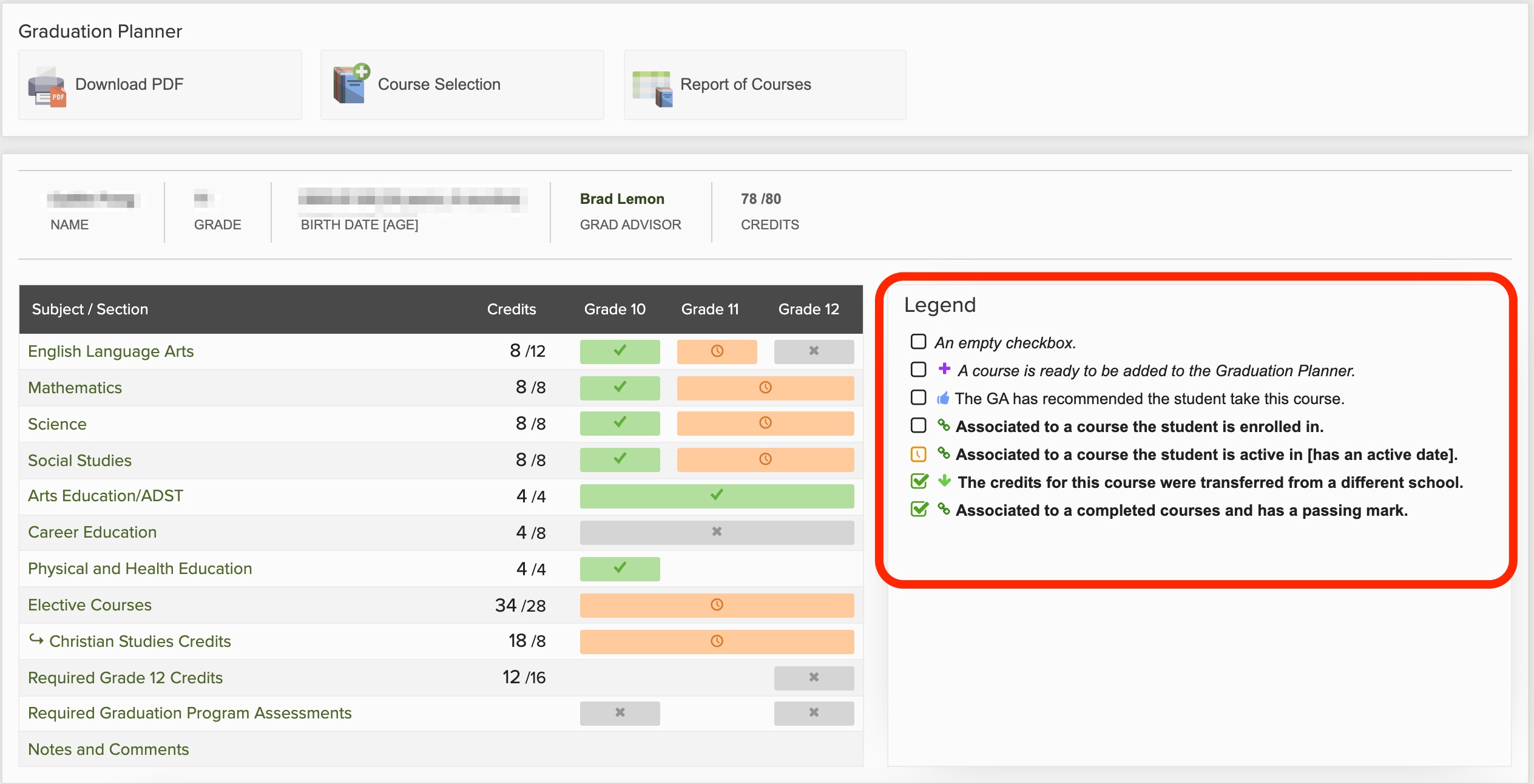
Additionally, see the Grad Planner for Families page here for a more detailed explanation of the most commonly seen icons and colours.
Can I print a copy of my Grad Planner?
Yes! To generate a print or PDF copy of your Grad Planner, navigate to the top of your Grad Planner, where you will see a Download PDF button. Click on that button, and it will save a PDF of the Grad Planner, which you can print.

Please note, your electronic grad planner will automatically update when courses are completed, so be sure you are working with the most recent version of your grad planner when planning future courses.
Who do I contact if I have questions about the Grad Planner?
Please contact your Grad Advisor if you have any questions.
Math Course Options and Streams
This page provides information regarding the various courses and streams a student can take at HCOS for Math

Students in Grade 10 will have to make a decision regarding what Math courses to take
Things to consider when choosing a Math Stream:
- Students need a Math 11 or 12 course credit in order to graduate with a Dogwood diploma.
- Students can still go to university or college without taking the Foundations & Pre-Calculus Math Route. However, students may not be able to enter into the Sciences or Engineering streams.
- Pre-Calculus 12 should be taken if interested in going to a top-level university.
- Nursing Programs or Business Programs usually require Pre-Calculus 11 or Foundations 12.
- Students interested in going into trades should take Apprenticeship Math 12
- Workplace Math 10 is the prerequisite for either Workplace Math 11 or Apprenticeship 12
- Workplace Math 11 and Apprenticeship 12 are equivalent in workload and difficulty.
If you’d like to find out the content that is covered in a particular course, please view the Course Description Website
The Role of the Academic Advisor
In the grad program at Flex Academy, students are connected with an Academic Advisor. The Academic Advisor works alongside students and families throughout their time in the grad program to help plan, support and guide students to successfully complete grade 12.
Academic Advisors are typically available during regular school hours to connect with students and families. They are willing and able to communicate in a variety of ways, including email, phone calls, in-person meetings or Zoom chats. Below is a brief outline of what your Academic Advisor can help you with, and what things are outside of their responsibilities.
Academic Advisors are Responsible for:
|
Knowing Students |
GA’s want to get to know students in order to understand a student's strengths and challenges. This helps them tailor a specific path to graduation for each student.
|
|
Academic Advising and Course Selection |
This is the main job of our Academic Advisors and it includes:
|
|
Grad Planner |
GA’s update and maintain the grad planner tool in Encom. This represents a student’s current plan and path to graduation. |
|
Share Relevant Community Information |
GA’s will communicate general information as it is made available. Throughout the year this may include:
|
|
Student Record Transfers |
Ga’s will facilitate the transfer of student records and information to new schools when students leave Flex Academy.
|
Academic Advisors may also:
|
Give advice, share ideas, brainstorm options |
GA’s may give advice on or suggest potential careers or areas of study that line up with student interests and abilities. This will vary among GA’s as each of them have different life experiences and areas of expertise. |
|
Discuss Provincial Assessment preparation |
GA’s can provide guidance to help plan, register, and prepare for Provincial Assessments
|
|
Write Reference Letters |
With enough time and information provided, GA’s are willing to write reference letters for scholarships and post-secondary applications.
|
Academic Advisors do not:
|
Act on behalf of a course instructor or teacher |
GA’s will not respond to or interpret course specific questions or instructions (interpret teacher emails etc).
|
|
Complete application forms for students |
Post-Secondary Applications
Scholarship Applications
|
|
Provide regular, daily support for students |
GA’s do not monitor student work, activity, or engagement of students in their courses (or with teachers) on a daily basis to report to parents. It is the responsibility of the parent to maintain the ongoing, regular oversight of their student as they work through their grade 10-12 courses.
|
|
Set up LS/IE Assessments or Services |
This is the responsibility of the Flex Academy IE Coordinator. They will contact you directly once the referral process is completed. |
Part-Time Enrollment At Flex Academy
This page provides information for families interested in cross-enrolling with Flex Academy.
HCOS Students Cross Enrolling in Flex Courses
HCOS Grade 10-12 students who wish to take a face-to-face offering at Flex may do so with approval from the Flex Admin. Families can express interest through this Cross-Enrollment Registration Form:
Flex Cross-Enrollment Registration Form
HCOS students should NOT complete a separate Flex Academy Encom application.
Completing an expression of interest does not mean that students will automatically be accepted. While it is our heart to serve as many students as possible in the face to face environment, class composition and capacity will be considered before accepting students. Spaces are given to full-time enrolling students before part-time applications are considered.
HCOS students will be charged a tuition for face-to-face courses at Flex. These tuition amounts are adjusted each year and are posted in the table below. Families will also be charged a non-refundable $100 application fee.
External Students Enrolling as Part-Time Flex Students
Students who are not currently attending Flex Academy are also welcome to enrol at Flex as part-time students. Families can complete an application through our website and select "Part-Time" as their Enrollment preference.
Completing an application does not mean that students will automatically be accepted. While it is our heart to serve as many students as possible in the face-to-face environment, class composition and capacity will be considered before accepting students. Spaces are given to full-time enrolling students before part-time applications are considered.
Part-time students will be charged tuition for courses at Flex. These tuition amounts are adjusted each year and are posted in the table below. Families will also be charged a non-refundable $100 application fee.
2026-2027 Preliminary Part-Time Tuition Info
Part-time/Cross-Enrolling students can take 3 or fewer courses with Flex Academy. Once students are taking four or more courses with Flex Academy, they are considered full-time Flex students and pay full tuition. You can view Flex tuition rates here.
The "First Course" fee is higher than the fees for the second and third courses. This extra charge subsidizes the students' involvement in retreats, clubs, trips, graduation, and other school events.
| Number of Courses | Annual Tuition Per Course |
| First Course | $1,160 |
| Two Courses | $2,110 |
| Three Courses | $3,060 |
What to expect after submitting an Expression of Interest
Once the expression of interest form or application is completed, the family will be invited to join in a meet & greet and tour to learn more about Flex and allow the Flex admin to further understand the student and family’s goals and hopes related to attending Flex. From there, the Flex admin will review class composition and capacity and determine if they are able to accept the student. Wherever possible, the Flex admin team will alert families prior to meet & greets if classes are full, etc.
If the student has been accepted and the student is an HCOS student, the HCOS student’s Grad Advisor will be notified and will add the Flex course offerings to the students course list in Encom.
Computer Loans for Part-Time Students
All students attending Flex Academy must have their own laptop to use at school. Flex Academy will loan computers out to students taking three or more courses with Flex Academy. Students taking one or two courses must provide their own laptop.
If you have further questions about cross-enrolling with Flex Academy, please contact your Grad Advisor or our office (info@flex.academy).
Transitioning from Grade 9
Welcome to the Grad Program!
This page is to help you understand some of the ins and outs and changes as you move from Grade 9 to Grade 10. At any time, if the information is confusing please feel free to reach out to your Grad Advisor (GA). They are your sidekick through your grad years!
Student Support
There are lots of resources and people to support your student's learning journey:
- The Office - office@flex.academy
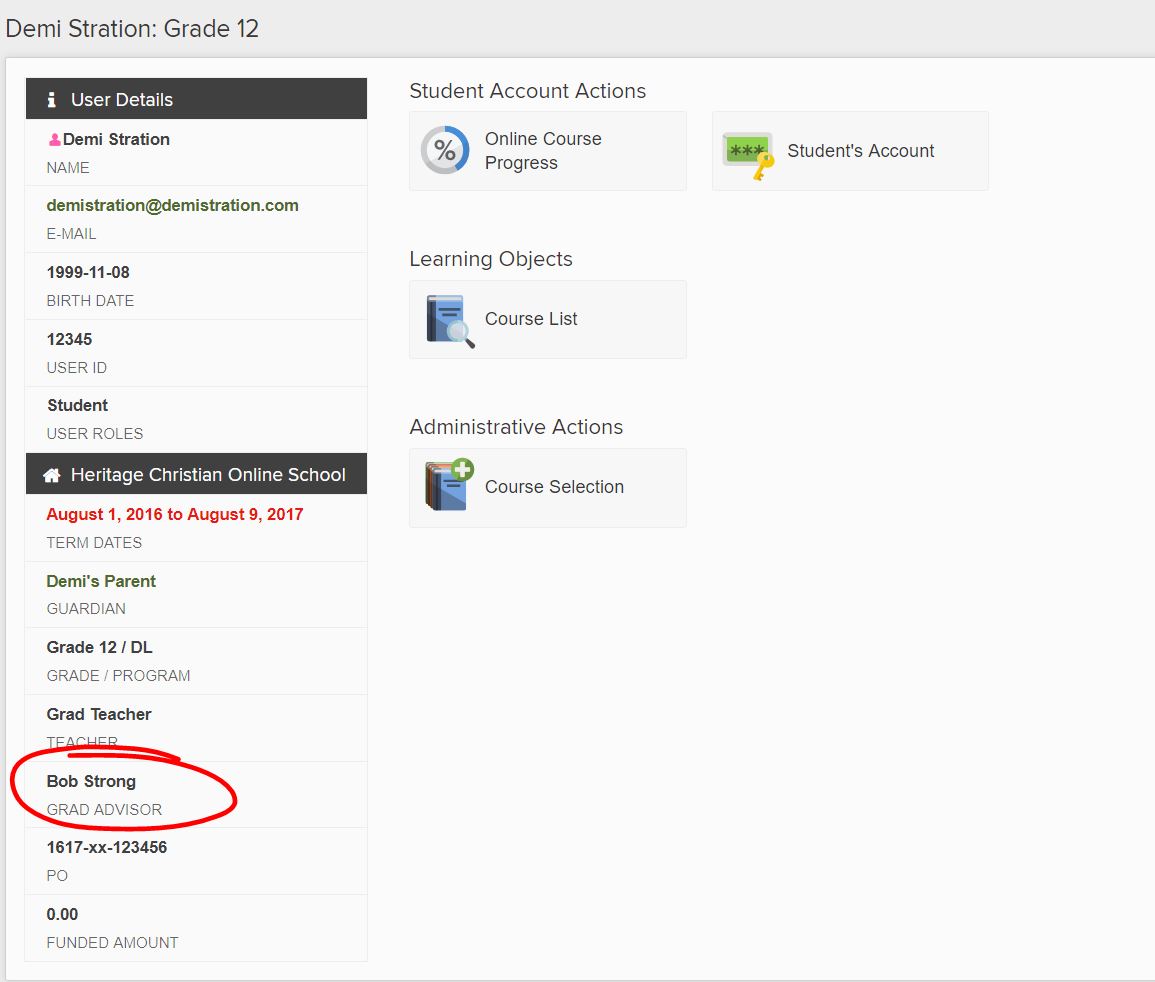
- Your Grad Advisor - check Encom under your Home information:

Your Grad Advisor is the one to answer any questions you have about the grad program, requirements, course selection - the list goes on! - Your Student's Teachers - each course, online or individualized, has a course specialist teacher at the grad program level. Please feel welcome to reach out at anytime to have discussions, or check in to see where you student is at.
- Director of Flex Academy - Bri Dyck, bri.dyck@flex.academy
- Inclusive Education (IE) Department - Learning Services (LS) and Inclusive Education. If this is something you feel your student could benefit from, please bring it up in discussion with your Grad Advisor who can connect you to the right person on the team!
Prerequisite Courses
Although the ministry does not mandate prerequisite courses - having taken a specific course before being able to take another - it is highly recommended that in core subject areas you have completed the prior grade level.
Core Courses: Mathematics, Sciences, English Language Arts and Social Studies
For example, to take Foundations and PreCalculus Math 10, it is expected that a student has successfully demonstrated completion of a Math 9 course.
Course Types
The Flex Academy grad program currently has three different types of course offerings, all with subject specialist teachers:
- Flex Academy Hybrid Courses
Flex Hybrid courses are a creative blend of online and in-person learning. These courses use Bright Space as a platform to structure the learning journey and are teacher-directed. Teachers post material for students to follow along with in a synchronized fashion. Teachers host learning labs for students where they engage in hands-on learning related to the course material. - Flex Academy Traditional in-person courses. Flex Academy offers a variety of in-person elective courses in Physical Education, the Sciences and the Arts.
- HCOS Online Courses
These courses are hosted in Bright Space, and all the of the learning activities and resources are provided for the students to complete. Curriculum is designed by the HCOS team and directed by an HCOS teacher. Parent involvement is encouraged, though not required.
All courses follow the modernized curriculum and the content outcomes, curricular competencies, core competencies, big ideas as well as biblical worldview integrations.
Please feel free to check out the ministry curriculum here.
Starting in 2023, during your Grade 9 year at Flex, you will have been able to try several online courses. Middle school students at Flex Academy will also complete several hybrid courses during their middle school years. This will greatly support students in their most flexible years at the Academy during the grad program, where they will have opportunities to schedule their course loads in a way that fits their needs.
While in middle school, students should participate in their learning by understanding what is expected from their teachers and communicating regularly to ask questions, seek clarification and let teachers know what works and doesn't work for them as learners. When students do this at younger ages with the support of their families, the transition to those discussions with the grad program teachers will be smoother.
For more tips and tricks about getting ready for the Grad Program, please click here.
Viewing Graduation Assessment Results and Your Transcript
This page provides information for students that would like to view their unofficial transcript or see the results of a Graduation Assessment Results.
Step 1: Create BCeID
To access your StudentTranscripts Services, you will need to sign up for a BCeID. If you already have a BCeID please go down to step 2.
- Complete the registration form for a Basic BCeID on the Ministry of Education's website
- Register for a Basic BCeID by entering your personal information. Use a personal email account that you will have for a number of years. When done, click continue.
- The next page will ask you to Register for StudentTranscripts. You will need information used by your School of Record (ex. Personal Education Number).
- You will receive a confirmation email indicating that you have registered for the BC Ministry of Education StudentTranscripts services. To complete the registration process you will need to activate your StudentTranscript Registration.
Be sure to keep your userID and password on file as you will need both for future use.
Step 2: Register for StudentTranscript Services
- Log in to StudentTranscript Services using your BCeID information (userID and password).
- Once logged in you will have access to:
- Transcripts & Certificates
- Account Information
- Marks & Scholarships
- System Notice(s)