# Seesaw - Sign In Instructions for Foundations K-9 and Inclusive Education Parents

At HCOS, we are setting up Seesaw this year to make it easier for families to share learning. Each family will receive a 'Class Sign In Code' unique to their family that will give them access to Seesaw as a ‘student’ in their teacher’s virtual Seesaw classroom. With this code, parents will see all of their children in one class and can easily add work samples for any child in their family.

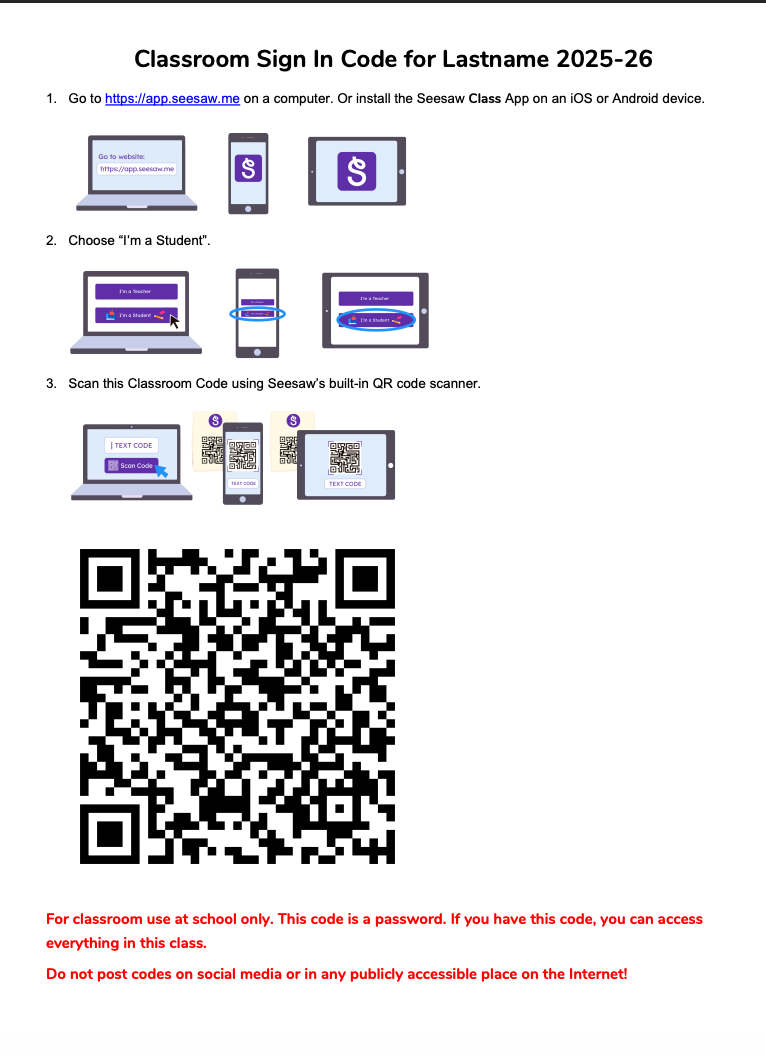
The 'Classroom Sign in Code' document your teacher sends you will provide step-by-step instructions. Your teacher may have sent it by screenshot or PDF. Sample 'Classroom Sign In Code' document:
<span id="bkmrk--1" style="font-weight: normal;"><span style="font-size: 11pt; font-family: Poppins, sans-serif; color: rgb(0, 0, 0); background-color: transparent; font-weight: 400; font-style: normal; font-variant: normal; white-space-collapse: preserve;"><span style="border-width: initial; border-style: none; display: inline-block; overflow: hidden; width: 375px; height: 513px;">![](https://sophie.onlineschool.ca/uploads/images/gallery/2025-09/embedded-image-ddjqzfzn.png)</span></span></span>


##### Step One

You will receive the ‘Seesaw Sign-in Information’ from your teacher with your 'Class QR Code'.

##### Step Two

<span id="bkmrk--3" style="font-weight: normal;"></span>

<p class="callout info"><span style="font-size: 11pt; font-family: Poppins,sans-serif; color: #000000; background-color: transparent; font-weight: 400; font-style: normal; font-variant: normal; text-decoration: none; vertical-align: baseline; white-space: pre-wrap;"><span style="font-size: 11pt; font-family: Poppins, sans-serif; color: rgb(0, 0, 0); background-color: transparent; font-weight: 400; font-variant: normal; text-decoration: none; vertical-align: baseline; white-space: pre-wrap;">If you have not downloaded the </span><span style="font-size: 11pt; font-family: Poppins, sans-serif; color: rgb(0, 0, 0); background-color: transparent; font-weight: bold; font-variant: normal; text-decoration: none; vertical-align: baseline; white-space: pre-wrap;">Seessaw Class app</span><span style="font-size: 11pt; font-family: Poppins, sans-serif; color: rgb(0, 0, 0); background-color: transparent; font-weight: 400; font-variant: normal; text-decoration: none; vertical-align: baseline; white-space: pre-wrap;">, download the app on iOS or Android device.</span><span style="font-size: 11pt; font-family: Poppins,sans-serif; color: #000000; background-color: transparent; font-weight: 400; font-style: normal; font-variant: normal; text-decoration: none; vertical-align: baseline; white-space: pre-wrap;"> </span></span></p>

<span style="font-size: 11pt; font-family: Poppins,sans-serif; color: #000000; background-color: transparent; font-weight: 400; font-style: normal; font-variant: normal; text-decoration: none; vertical-align: baseline; white-space: pre-wrap;">Open the Seesaw App on your phone or tablet:</span>

<span style="font-size: 11pt; font-family: Poppins,sans-serif; color: #000000; background-color: transparent; font-weight: 400; font-style: normal; font-variant: normal; text-decoration: none; vertical-align: baseline; white-space: pre-wrap;"><span style="border: none; display: inline-block; overflow: hidden; width: 79px; height: 70px;">![](https://sophie.onlineschool.ca/uploads/images/gallery/2025-09/embedded-image-5mccliob.png)</span></span><span style="font-size: 11pt; font-family: Poppins,sans-serif; color: #000000; background-color: transparent; font-weight: 400; font-style: normal; font-variant: normal; text-decoration: none; vertical-align: baseline; white-space: pre-wrap;"> </span>

<span style="font-size: 11pt; font-family: Poppins,sans-serif; color: #000000; background-color: transparent; font-weight: 400; font-style: normal; font-variant: normal; text-decoration: none; vertical-align: baseline; white-space: pre-wrap;">OR </span>

<span style="font-size: 11pt; font-family: Poppins,sans-serif; color: #000000; background-color: transparent; font-weight: 400; font-style: normal; font-variant: normal; text-decoration: none; vertical-align: baseline; white-space: pre-wrap;">Go to </span>[<span style="font-size: 11pt; font-family: Poppins,sans-serif; color: #1155cc; background-color: transparent; font-weight: 400; font-style: normal; font-variant: normal; text-decoration: underline; -webkit-text-decoration-skip: none; text-decoration-skip-ink: none; vertical-align: baseline; white-space: pre-wrap;">app.seesaw.me</span>](http://app.seesaw.me)<span style="font-size: 11pt; font-family: Poppins,sans-serif; color: #000000; background-color: transparent; font-weight: 400; font-style: normal; font-variant: normal; text-decoration: none; vertical-align: baseline; white-space: pre-wrap;"> for laptops and computers. </span>

##### Step Three

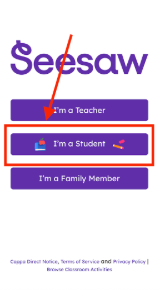
Click on the purple 'I’m a Student' button.
<span id="bkmrk--6" style="font-weight: normal;"><span style="font-size: 11pt; font-family: Poppins, sans-serif; color: rgb(0, 0, 0); background-color: transparent; font-weight: 400; font-style: normal; font-variant: normal; white-space-collapse: preserve;"><span style="border-width: initial; border-style: none; display: inline-block; overflow: hidden; width: 241px; height: 439px;">![](https://sophie.onlineschool.ca/uploads/images/gallery/2025-09/embedded-image-3xsdvovu.png)</span></span></span>


##### Step Four

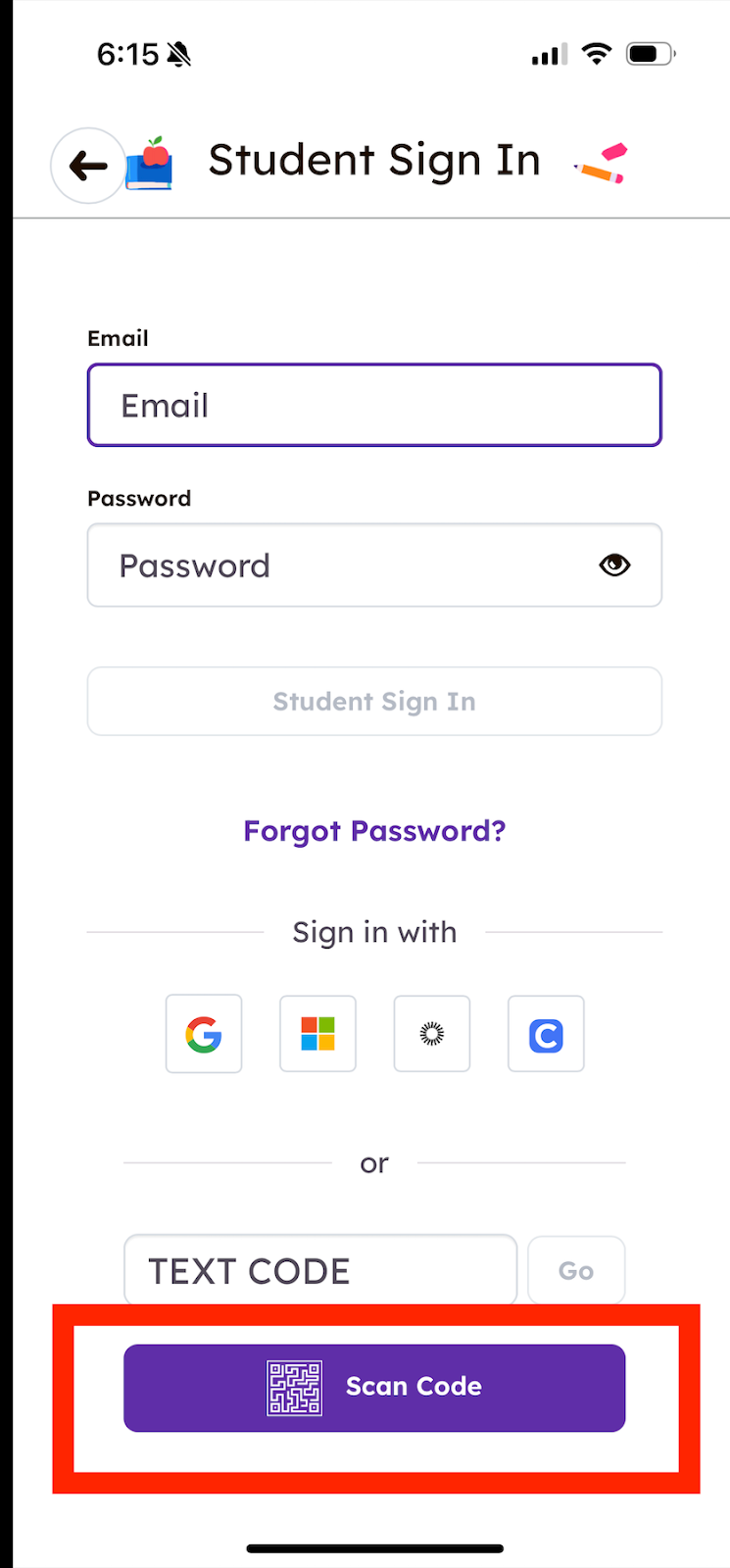
A Student Sign In page will open in the Seesaw App.

- Click the 'Scan Code' purple button and a Seesaw 'QR Code' scanner will open
- Next, scan the 'Classroom Code' using the built in Seesaw 'QR Code' scanner
- Hold the phone up to the QR code provided by your teacher.

The QR scanner is able to scan the code from a printed piece of paper or an open screen on a computer.

See images below that go with the steps:
<span id="bkmrk--8" style="font-weight: normal;"><span style="font-size: 11pt; font-family: Poppins, sans-serif; color: rgb(0, 0, 0); background-color: transparent; font-weight: 400; font-style: normal; font-variant: normal; white-space-collapse: preserve;"><span style="border-width: initial; border-style: none; display: inline-block; overflow: hidden; width: 252px; height: 542px;">![](https://sophie.onlineschool.ca/uploads/images/gallery/2025-09/embedded-image-zb0kbjfn.png)</span></span></span>

<span style="color: #000000;"><span style="font-size: 14.6667px; white-space-collapse: preserve;"> </span></span>

<span style="color: #000000;"><span style="font-size: 14.6667px; white-space-collapse: preserve;">While in the Seesaw App with the 'Scan Code' open, hold in front of the device or a copy of the QR code. </span></span>

<p class="callout info"><span style="color: #000000;"><span style="font-size: 14.6667px; white-space-collapse: preserve;">If using a computer, hold the QR code up to the computer camera. </span></span></p>

Your family class will now open!

After this initial setup, you should not need to sign in again unless you sign yourself out.

If you accidentally sign yourself out, contact your teacher for a new code.