# Navigating the Landing Page in Brightspace

<span style="font-size: 11pt; font-family: Arial; color: #000000; background-color: transparent; font-weight: 400; font-style: normal; font-variant: normal; text-decoration: none; vertical-align: baseline; white-space: pre-wrap;">Brightspace is the Learning Management System (LMS) used by HCOS to offer a wide variety of courses including online (asynchronous and synchronous), hybrid, Community Connections + and even some individualized offerings. </span>

<span style="font-size: 11pt; font-family: Arial; color: #000000; background-color: transparent; font-weight: 400; font-style: normal; font-variant: normal; text-decoration: none; vertical-align: baseline; white-space: pre-wrap;">  
While course experiences may be different depending on what offerings you are enrolled in, the general user experience is the same.   
  
</span>

<span style="font-size: 11pt; font-family: Arial; color: #000000; background-color: transparent; font-weight: 400; font-style: normal; font-variant: normal; text-decoration: none; vertical-align: baseline; white-space: pre-wrap;">To login, navigate to hcos.onlinelearningbc.com or </span>[<span style="font-size: 11pt; font-family: Arial; color: #1155cc; background-color: transparent; font-weight: 400; font-style: normal; font-variant: normal; text-decoration: underline; -webkit-text-decoration-skip: none; text-decoration-skip-ink: none; vertical-align: baseline; white-space: pre-wrap;">click here</span>](https://hcos.onlinelearningbc.com/d2l/login)<span style="font-size: 11pt; font-family: Arial; color: #000000; background-color: transparent; font-weight: 400; font-style: normal; font-variant: normal; text-decoration: none; vertical-align: baseline; white-space: pre-wrap;">. Click the Teacher &amp; Student login button and enter your username and password. If you do not know your password, please click the forgot password link, and if you are unsure of your username please reach out to your Support Teacher or Grad Advisor. </span>

[![image.png](https://sophie.onlineschool.ca/uploads/images/gallery/2023-03/scaled-1680-/xcUimage.png)](https://sophie.onlineschool.ca/uploads/images/gallery/2023-03/xcUimage.png)

<span style="font-size: 11pt; font-family: Arial; color: #000000; background-color: transparent; font-weight: 400; font-style: normal; font-variant: normal; text-decoration: none; vertical-align: baseline; white-space: pre-wrap;">If it is your first time logging in, you will be prompted to walk through the Online Orientation. A pop-up window will appear and you will be instructed to read through the material provided. </span>

<span style="font-size: 11pt; font-family: Arial; color: #000000; background-color: transparent; font-weight: 400; font-style: normal; font-variant: normal; text-decoration: none; vertical-align: baseline; white-space: pre-wrap;"><span style="border: none; display: inline-block; overflow: hidden; width: 375px; height: 253px;">![](https://lh6.googleusercontent.com/FeuOOzB9E4-eHukXya31eakxJIDKON-1Zw-gl3_rL7uxvJMZMviAQKy2LyS74Z2LvsdA_BVka7ZYJAIIeT4yZUJVmDBVxfrqQG8srhc1cBgKnbXJtZhNMOyfquDC1CgYaSADDiHGCRgrG95yISNratg)</span></span>

<span style="font-size: 11pt; font-family: Arial; color: #000000; background-color: transparent; font-weight: 400; font-style: normal; font-variant: normal; text-decoration: none; vertical-align: baseline; white-space: pre-wrap;">Once you have logged in and completed the Online Orientation, you will be taken to the landing page. On the landing page you will see a few different categories of information:</span>

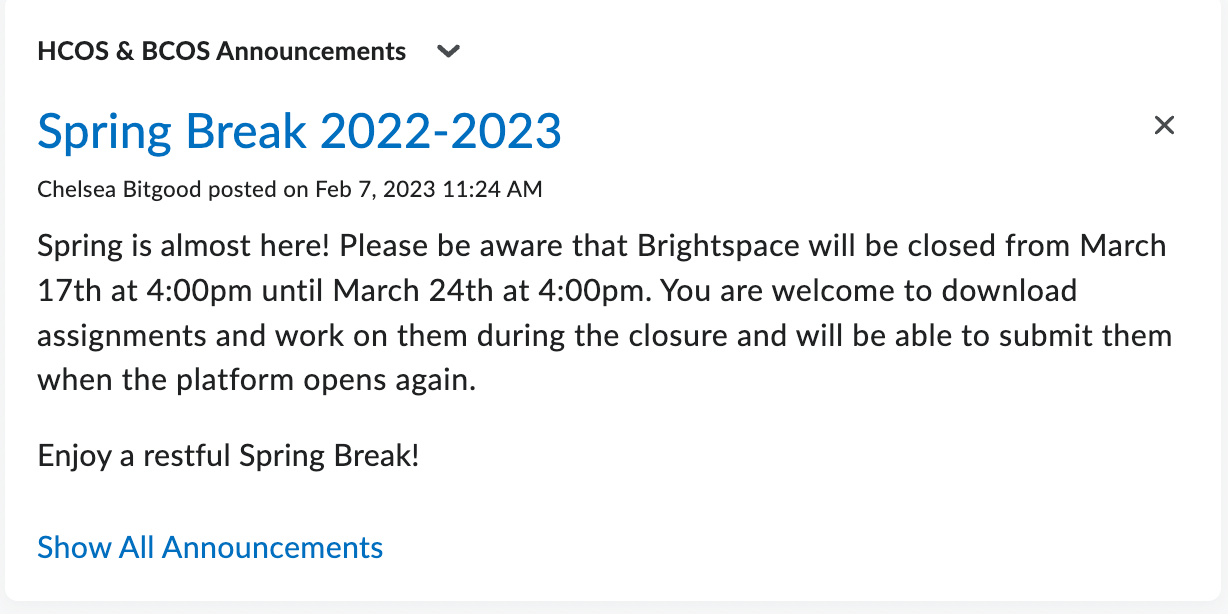
<div align="left" dir="ltr" id="bkmrk-hcos-%26-bcos-announce" style="margin-left: 0pt;"><table style="border: none; border-collapse: collapse; table-layout: fixed; width: 468pt;"><colgroup><col></col><col></col></colgroup><tbody><tr style="height: 0pt;"><td style="vertical-align: top; padding: 5pt 5pt 5pt 5pt; overflow: hidden; overflow-wrap: break-word; border: solid #000000 1pt;"><span style="font-size: 11pt; font-family: Arial; color: #000000; background-color: transparent; font-weight: bold; font-style: normal; font-variant: normal; text-decoration: none; vertical-align: baseline; white-space: pre-wrap;">HCOS &amp; BCOS Announcements</span>

<span style="font-size: 11pt; font-family: Arial; color: #000000; background-color: transparent; font-weight: 400; font-style: normal; font-variant: normal; text-decoration: none; vertical-align: baseline; white-space: pre-wrap;">This is where schoolwide announcements will be placed for students. Students can expand to see all previous announcements made. </span>

</td><td style="vertical-align: top; padding: 5pt 5pt 5pt 5pt; overflow: hidden; overflow-wrap: break-word; border: solid #000000 1pt;"><span style="font-size: 11pt; font-family: Arial; color: #000000; background-color: transparent; font-weight: 400; font-style: normal; font-variant: normal; text-decoration: none; vertical-align: baseline; white-space: pre-wrap;"><span style="border: none; display: inline-block; overflow: hidden; width: 298px; height: 149px;">![](https://lh5.googleusercontent.com/Ghva3uYDrq9t1vjbHcGrYpq1LOe3gui2vJXY0ICCRPMLX7pqxaOGWyT4NKiV2nKrCAGdmk1iLbZJDLJ7u1tfK-Eo25okQwFAe5rbmziu2pRu2XqzKvfNpYrMshEB7yEzT2nbb-PBbyso_51M-qFWjDY)</span></span>

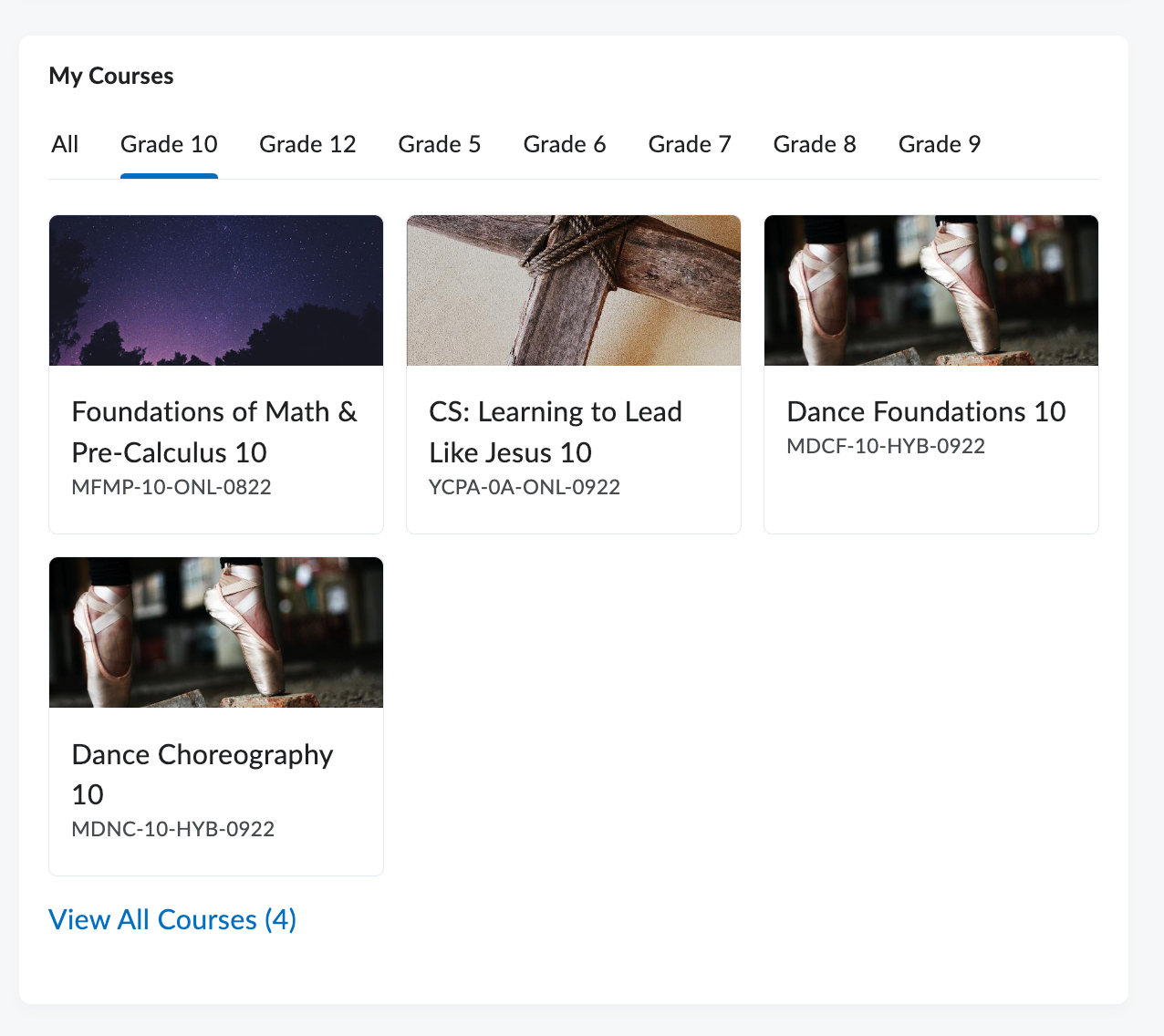
</td></tr><tr style="height: 0pt;"><td style="vertical-align: top; padding: 5pt 5pt 5pt 5pt; overflow: hidden; overflow-wrap: break-word; border: solid #000000 1pt;"><span style="font-size: 11pt; font-family: Arial; color: #000000; background-color: transparent; font-weight: bold; font-style: normal; font-variant: normal; text-decoration: none; vertical-align: baseline; white-space: pre-wrap;">My Courses</span>

<span style="font-size: 11pt; font-family: Arial; color: #000000; background-color: transparent; font-weight: 400; font-style: normal; font-variant: normal; text-decoration: none; vertical-align: baseline; white-space: pre-wrap;">There is where students will find shortcuts to each of their enrolled classes. They can sort by all, or by grade level if they are enrolled in offerings associated at different grades. </span>

</td><td style="vertical-align: top; padding: 5pt 5pt 5pt 5pt; overflow: hidden; overflow-wrap: break-word; border: solid #000000 1pt;"><span style="font-size: 11pt; font-family: Arial; color: #000000; background-color: transparent; font-weight: 400; font-style: normal; font-variant: normal; text-decoration: none; vertical-align: baseline; white-space: pre-wrap;"><span style="border: none; display: inline-block; overflow: hidden; width: 298px; height: 265px;">![](https://lh3.googleusercontent.com/rVMb8nfb5hz7mMgGqmonA7MREhwt9jRtXOZc0fp_puAKq5aoyS1asJbtgU3u_jULDKDJ3sGO8rPqsovSa_0E_NKqoEa8vnZacFEuxG-nl0l3PrAtARgrKpugv7-evqGp51z7-80AxVdLmKcsFv9BypI)</span></span>

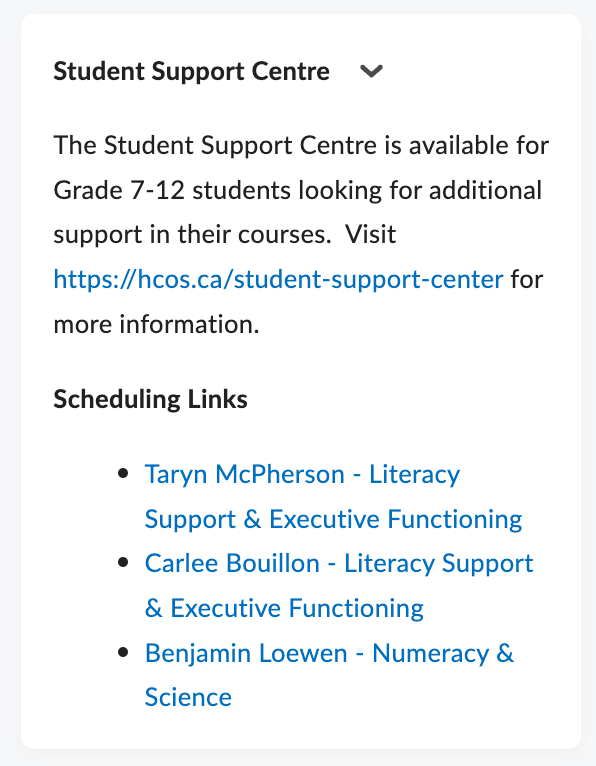
</td></tr><tr style="height: 0pt;"><td style="vertical-align: top; padding: 5pt 5pt 5pt 5pt; overflow: hidden; overflow-wrap: break-word; border: solid #000000 1pt;"><span style="font-size: 11pt; font-family: Arial; color: #000000; background-color: transparent; font-weight: bold; font-style: normal; font-variant: normal; text-decoration: none; vertical-align: baseline; white-space: pre-wrap;">Student Success Centre</span>

<span style="font-size: 11pt; font-family: Arial; color: #000000; background-color: transparent; font-weight: 400; font-style: normal; font-variant: normal; text-decoration: none; vertical-align: baseline; white-space: pre-wrap;">This widget gives students direct access to the Student Success Educational Assistants. Need some help in one of your courses? Feel free to book an appointment directly, using the links provided. </span>

</td><td style="vertical-align: top; padding: 5pt 5pt 5pt 5pt; overflow: hidden; overflow-wrap: break-word; border: solid #000000 1pt;"><span style="font-size: 11pt; font-family: Arial; color: #000000; background-color: transparent; font-weight: 400; font-style: normal; font-variant: normal; text-decoration: none; vertical-align: baseline; white-space: pre-wrap;"><span style="border: none; display: inline-block; overflow: hidden; width: 265px; height: 340px;">![](https://lh3.googleusercontent.com/kHj6LdwHkuAkgQLdn4qOxxGr-G8BESiITOBF4Bksm5Fv1glw0K4bWfL4KefnK746ReshhOJj0hUpBaRayTYZ2wrj9NBULPb2WGDwMtX6PCE3kzOjmz1UO8Y_V488iHIa3QdKSko0bs-VYr4aIPS3kZA)</span></span>

</td></tr><tr style="height: 0pt;"><td style="vertical-align: top; padding: 5pt 5pt 5pt 5pt; overflow: hidden; overflow-wrap: break-word; border: solid #000000 1pt;"><span style="font-size: 11pt; font-family: Arial; color: #000000; background-color: transparent; font-weight: 400; font-style: normal; font-variant: normal; text-decoration: none; vertical-align: baseline; white-space: pre-wrap;">My Courses in Other Orgs</span>

<span style="font-size: 11pt; font-family: Arial; color: #000000; background-color: transparent; font-weight: 400; font-style: normal; font-variant: normal; text-decoration: none; vertical-align: baseline; white-space: pre-wrap;">Are you cross enrolled with another school for an online offering? If so, you will have direct access through this widget to navigate to those courses. </span>

</td><td style="vertical-align: top; padding: 5pt 5pt 5pt 5pt; overflow: hidden; overflow-wrap: break-word; border: solid #000000 1pt;"><span style="font-size: 11pt; font-family: Arial; color: #000000; background-color: transparent; font-weight: 400; font-style: normal; font-variant: normal; text-decoration: none; vertical-align: baseline; white-space: pre-wrap;"><span style="border: none; display: inline-block; overflow: hidden; width: 298px; height: 215px;">![](https://lh6.googleusercontent.com/rKHSX5rX_bQNf7ek3YFEJnuuIDPko7H0UYWIHP4WPTc2IAVX1VV8Iouf6sZYINYXBtQf6oDmPHDm_reskNQRH1X7f5AClET4AKSFzz1V09Jq_qNhTVhDq12Z50YdqDoLbQ4ZtxmGI6Vd5ss--W7p05Q)</span></span>

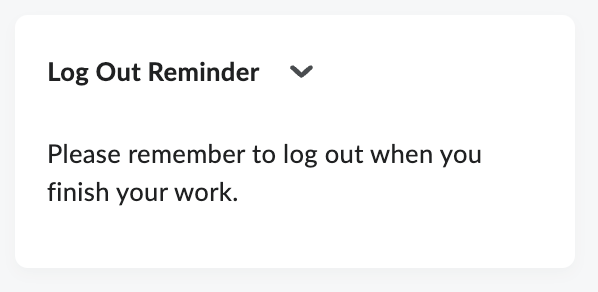
</td></tr><tr style="height: 0pt;"><td style="vertical-align: top; padding: 5pt 5pt 5pt 5pt; overflow: hidden; overflow-wrap: break-word; border: solid #000000 1pt;"><span style="font-size: 11pt; font-family: Arial; color: #000000; background-color: transparent; font-weight: 400; font-style: normal; font-variant: normal; text-decoration: none; vertical-align: baseline; white-space: pre-wrap;">Log Out Reminder</span>

<span style="font-size: 11pt; font-family: Arial; color: #000000; background-color: transparent; font-weight: 400; font-style: normal; font-variant: normal; text-decoration: none; vertical-align: baseline; white-space: pre-wrap;">It is best practice to log out of your session every time you are finished working. Brightspace will automatically log you out after three hours if there is no activity registered. </span>

</td><td style="vertical-align: top; padding: 5pt 5pt 5pt 5pt; overflow: hidden; overflow-wrap: break-word; border: solid #000000 1pt;"><span style="font-size: 11pt; font-family: Arial; color: #000000; background-color: transparent; font-weight: 400; font-style: normal; font-variant: normal; text-decoration: none; vertical-align: baseline; white-space: pre-wrap;"><span style="border: none; display: inline-block; overflow: hidden; width: 298px; height: 145px;">![](https://lh3.googleusercontent.com/PuuwaRK5pdHhMS1zYKNjQeYu6vHawCz1cB2HoDfGtm-_m6kjNlPcoMH4n9imlfU3FDUs-Hp8H1bpuTWTeKuYZ34wvqQrQeVJ_OVo56ExWvMxHDuTi6bBl3D00GxTRw-eQIqhHKCoSbN2b6B5DuP3RhU)</span></span>

</td></tr></tbody></table>

</div><span style="font-size: 11pt; font-family: Arial; color: #000000; background-color: transparent; font-weight: 400; font-style: normal; font-variant: normal; text-decoration: none; vertical-align: baseline; white-space: pre-wrap;">In addition to the modules you see upon logging in, there are additional resources available to you through the navigation bar. </span>

<span style="font-size: 11pt; font-family: Arial; color: #000000; background-color: transparent; font-weight: 400; font-style: normal; font-variant: normal; text-decoration: none; vertical-align: baseline; white-space: pre-wrap;"><span style="border: none; display: inline-block; overflow: hidden; width: 624px; height: 80px;">![](https://lh3.googleusercontent.com/g_OHDGFQKFQMMphCcB7zbvNxUePS3PoaAaiu7k0LYJq88mRKxbqdoCjh-YN074Vepf2YmGRFMu7rxRo_SjIzDhOs_TLRJidXnSJROVWxsrlTQ_mOyJouX2A9Xn8ZG9ZiYcjrNQIDZ-FTSYsMD00FDDA)</span></span>

<div align="left" dir="ltr" id="bkmrk-progress-clicking-th" style="margin-left: 0pt;"><table style="border: none; border-collapse: collapse; table-layout: fixed; width: 468pt;"><colgroup><col></col><col></col></colgroup><tbody><tr style="height: 0pt;"><td style="vertical-align: top; padding: 5pt 5pt 5pt 5pt; overflow: hidden; overflow-wrap: break-word; border: solid #000000 1pt;"><span style="font-size: 11pt; font-family: Arial; color: #000000; background-color: transparent; font-weight: bold; font-style: normal; font-variant: normal; text-decoration: none; vertical-align: baseline; white-space: pre-wrap;">Progress</span>

<span style="font-size: 11pt; font-family: Arial; color: #000000; background-color: transparent; font-weight: 400; font-style: normal; font-variant: normal; text-decoration: none; vertical-align: baseline; white-space: pre-wrap;">Clicking this link will give you access to an overview of progress on all your enrolled courses. You can navigate to each course individually using the list on the left hand side. </span>

<span style="font-size: 11pt; font-family: Arial; color: #000000; background-color: transparent; font-weight: 400; font-style: normal; font-variant: normal; text-decoration: none; vertical-align: baseline; white-space: pre-wrap;">Once in your course, if you've setup the Pacing &amp; Progress Tool you can check there for progress as well. </span>

</td><td style="vertical-align: top; padding: 5pt 5pt 5pt 5pt; overflow: hidden; overflow-wrap: break-word; border: solid #000000 1pt;"><span style="font-size: 11pt; font-family: Arial; color: #000000; background-color: transparent; font-weight: 400; font-style: normal; font-variant: normal; text-decoration: none; vertical-align: baseline; white-space: pre-wrap;"><span style="border: none; display: inline-block; overflow: hidden; width: 298px; height: 277px;">![](https://lh6.googleusercontent.com/yV0nN66YQk9JZRArm2ScHlPQ9sEYhsNWuClvodKevJ4uTbKdmdXc6-ZyNzAAtqCmcKWeICmwSDEKtGaox8NNvhcV1j0CbusZNSbb0aXE_x5_jgYELg8lsYsoLvUFkUZdgoMxaeQWY1M6X5xV3mxxrsE)</span></span>

[![Screenshot 2026-02-19 114249.jpg](https://sophie.onlineschool.ca/uploads/images/gallery/2026-02/scaled-1680-/screenshot-2026-02-19-114249.jpg)](https://sophie.onlineschool.ca/uploads/images/gallery/2026-02/screenshot-2026-02-19-114249.jpg)  
</td></tr><tr style="height: 0pt;"><td style="vertical-align: top; padding: 5pt 5pt 5pt 5pt; overflow: hidden; overflow-wrap: break-word; border: solid #000000 1pt;"><span style="font-size: 11pt; font-family: Arial; color: #000000; background-color: transparent; font-weight: bold; font-style: normal; font-variant: normal; text-decoration: none; vertical-align: baseline; white-space: pre-wrap;">Learning Commons</span>

<span style="font-size: 11pt; font-family: Arial; color: #000000; background-color: transparent; font-weight: 400; font-style: normal; font-variant: normal; text-decoration: none; vertical-align: baseline; white-space: pre-wrap;">A direct link to our Learning Commons website.</span>

</td><td style="vertical-align: top; padding: 5pt 5pt 5pt 5pt; overflow: hidden; overflow-wrap: break-word; border: solid #000000 1pt;"><span style="font-size: 11pt; font-family: Arial; color: #000000; background-color: transparent; font-weight: 400; font-style: normal; font-variant: normal; text-decoration: none; vertical-align: baseline; white-space: pre-wrap;"><span style="border: none; display: inline-block; overflow: hidden; width: 298px; height: 115px;">![](https://lh6.googleusercontent.com/q0ILg0vws7Qn-G5KXPK4NdSUKeW5vzjJCfaedHHB_NfpJzRZN4Gr2gx3omkvuLzXsyZeluMt-jHLxg_y4dI6K1IFVRuudhBGQBOzid1CAyi6K9keqs_5T83mQQ0c04AR3yFEqDDLM9wnaZqcNA9JJb0)</span></span>

</td></tr><tr style="height: 0pt;"><td style="vertical-align: top; padding: 5pt 5pt 5pt 5pt; overflow: hidden; overflow-wrap: break-word; border: solid #000000 1pt;"><span style="font-size: 11pt; font-family: Arial; color: #000000; background-color: transparent; font-weight: bold; font-style: normal; font-variant: normal; text-decoration: none; vertical-align: baseline; white-space: pre-wrap;">Learning Groups</span>

<span style="font-size: 11pt; font-family: Arial; color: #000000; background-color: transparent; font-weight: 400; font-style: normal; font-variant: normal; text-decoration: none; vertical-align: baseline; white-space: pre-wrap;">Ready to make a face-to-face connection. This link will direct you to our Learning Groups website where you can register for local events in your community. </span>

</td><td style="vertical-align: top; padding: 5pt 5pt 5pt 5pt; overflow: hidden; overflow-wrap: break-word; border: solid #000000 1pt;"><span style="font-size: 11pt; font-family: Arial; color: #000000; background-color: transparent; font-weight: 400; font-style: normal; font-variant: normal; text-decoration: none; vertical-align: baseline; white-space: pre-wrap;"><span style="border: none; display: inline-block; overflow: hidden; width: 298px; height: 191px;">![](https://lh3.googleusercontent.com/dWw75CY-Ssv75Uq41Cw-88RCe-W5yVBk1zFgtvELkKUu6v8s3kO_rdxfN0rvqR8568Voa2JhWFWWT7SPySxkP5MKQu5ATUrJBV1TXZKwRwu-5TanWZF5TJ6ouqj4gEQdVr1eHlgQB8Q8G7LCLNjC0xg)</span></span>

</td></tr><tr style="height: 0pt;"><td style="vertical-align: top; padding: 5pt 5pt 5pt 5pt; overflow: hidden; overflow-wrap: break-word; border: solid #000000 1pt;"><span style="font-size: 11pt; font-family: Arial; color: #000000; background-color: transparent; font-weight: bold; font-style: normal; font-variant: normal; text-decoration: none; vertical-align: baseline; white-space: pre-wrap;">Course Libraries</span>

<span style="font-size: 11pt; font-family: Arial; color: #000000; background-color: transparent; font-weight: 400; font-style: normal; font-variant: normal; text-decoration: none; vertical-align: baseline; white-space: pre-wrap;">Curious what HCOS has to offer. Click the course libraries tab to see what course offerings are available at different grade levels and in all subject areas. </span>

</td><td style="vertical-align: top; padding: 5pt 5pt 5pt 5pt; overflow: hidden; overflow-wrap: break-word; border: solid #000000 1pt;"><span style="font-size: 11pt; font-family: Arial; color: #000000; background-color: transparent; font-weight: 400; font-style: normal; font-variant: normal; text-decoration: none; vertical-align: baseline; white-space: pre-wrap;"><span style="border: none; display: inline-block; overflow: hidden; width: 298px; height: 121px;">![](https://lh5.googleusercontent.com/17i1gGR76OYzOynhFtfRUt0_rE7c9FJRZjhDjVJYvSgi9o-93nngMnABTkt2HKV99S4OBzhinOkNluTZZaPA-KIzcDO-jKvGBMfoT6sWHvfXY1IWSg3kVY30G4EdN-9xR0VKaWTmIaiwYbue8NZGVWI)</span></span>

</td></tr></tbody></table>

</div><span style="font-size: 11pt; font-family: Arial; color: #000000; background-color: transparent; font-weight: 400; font-style: normal; font-variant: normal; text-decoration: none; vertical-align: baseline; white-space: pre-wrap;">The additional icons by your username are for Messages and Profile. To find more information about those please visit these pages:</span><span style="font-size: 11pt; font-family: Arial; color: #000000; background-color: transparent; font-weight: 400; font-style: normal; font-variant: normal; text-decoration: none; vertical-align: baseline; white-space: pre-wrap;">  
</span>

1. [<span style="font-size: 11pt; font-family: Arial; color: #1155cc; background-color: transparent; font-weight: 400; font-style: normal; font-variant: normal; text-decoration: underline; -webkit-text-decoration-skip: none; text-decoration-skip-ink: none; vertical-align: baseline; white-space: pre-wrap;">Message, Subscriptions and Update Alerts</span>](https://sophie.onlineschool.ca/books/information-for-families/page/message-subscription-and-update-alerts)
2. [<span style="font-size: 11pt; font-family: Arial; color: #1155cc; background-color: transparent; font-weight: 400; font-style: normal; font-variant: normal; text-decoration: underline; -webkit-text-decoration-skip: none; text-decoration-skip-ink: none; vertical-align: baseline; white-space: pre-wrap;">Setting Up Your Brightspace Profile</span>](https://sophie.onlineschool.ca/books/information-for-families/page/setting-up-your-brightspace-profile)