# How to Re-Enroll or Re-Register at HCOS & Flex Academy
This page highlights the process to follow when re-enrolling or re-registering at HCOS.
- Sign in to your [Encom account](https://encom.onlineschool.ca/)
- If you do not recall your password, please go [here](https://encom.onlineschool.ca/public/forgotten-password).
- If you are unsure of your Username, don't hesitate to contact tickets@onlineschool.ca
- Click the appropriate button based on your child's program:
|  | [](https://sophie.onlineschool.ca/uploads/images/gallery/2023-01/re-register.png) |
- Read through the instructions, select **Yes** or **No**, and press the ***Save and Continue*** button to complete.
- Follow the instructions on the screen to complete the process.
PO Numbers will be issued and can be used near the end of April during the week of [HCOS Connect](https://connect.onlineschool.ca).
If you have any questions or need assistance, don't hesitate to contact the HCOS Office (office@onlineschool.ca) or 1-877-862-2375.
If your student is in the Home School Registered program, we have made it possible for you to follow the steps above to re-register.
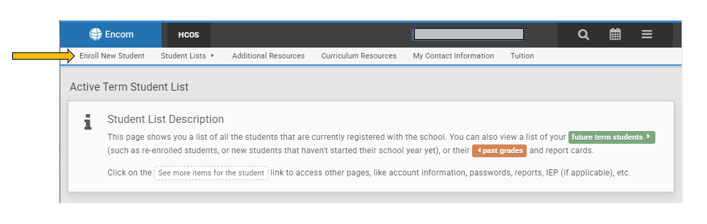
How to **enroll a new sibling** (any grade):
[](https://sophie.onlineschool.ca/uploads/images/gallery/2024-01/s5uimage.png)