**To access Encom, visit [https://encom.onlineschool.ca](https://encom.onlineschool.ca "www.onlineschool.ca")** If you forget your username or password please contact [Tech Support](mailto:tickets@onlineschool.ca)**.**
When you access Encom, this is approximately what you will see. Please take the time to become familiar with the various components of Encom***.*** 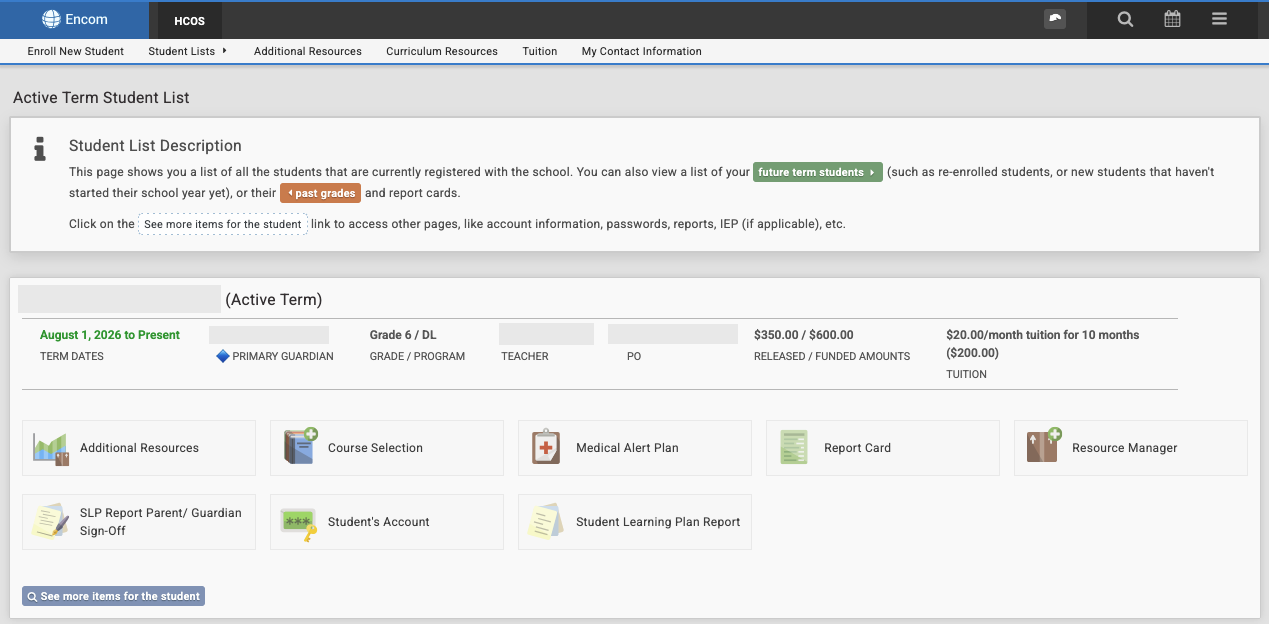 ### Main Pages Used by Guardians|  | The **Student Learning Plan** (SLP) is an oultine of the courses, activities, goals, and resources used by each student throughout the course of the year. Teachers collaborate closely with parents/guardians before it is written. When it is complete, it is important to review the SLP to see if there are any other pieces of info to add or adjust. When the SLP is complete, parents/guardians sign off on it using the **SLP Parent/Guaridan Sign-Off** icon link. |
|  | **Additional Resources** – This icon is where information related to the curriculum budget is tracked. Please check the curriculum budget before making purchases with the Purchase Order number to ensure there are enough funds for the purchase. |
|  | The **Report Card** links directly to each student's report card. If there are any difficulties viewing it, please contact the Support Teacher and they can help. |
| [](https://sophie.onlineschool.ca/uploads/images/gallery/2026-09/aSWimage.png) | The **Medical Alert Plan** module guides parents through providing critical information for students that will participate in face to face events when there is a medical concern. The MAP ensures onsite HCOS staff are equipped to respond to any medical event that may occur. If you are attending a face to face event, the MAP will be requested. |
|  | The **Self-Assessment Survey** is completed annually for each student and can be done in combination with the support teacher, student, and parent/guardian. Typically, Support Teachers share information related to this and guide parents through the process. |
|  | Select **See more items for the student** to access where the **Learning Standards** for each subject can be searched and viewed. This section of Encom can be useful to what the specific Learning Standards are for each subject. |
|  | Select **See more items for the student** to access the student **Contact Information** to make sure it's up to date or when it needs to be changed. To see parent/guardian email and other contact information, click on the name above **Guardian** on the main page in Encom. The HCOS Office should be notified of any changes as well at |
It is the teacher’s job to track the Learning Standards for students and are open to fielding questions on these for each student.