# Enrollment

# Enrolled Program Overview

HCOS will discuss the variety of support services, the responsibilities for families and also miscellaneous information during the initial interview.

### HCOS Support

#### Your Support Teacher will:

- Be your child’s Home Room teacher at HCOS and is responsible for your child’s educational program. They also support families through prayer, encouragement, and educational program guidance
- Have regular contact (emails, phone calls, home visits when possible and desired)
- Collaborate on a Student Learning Plan (SLP) starting in September and it may be adjusted throughout the year
- Provide assessment through regular feedback on work sample submitted weekly, Interim Grade Reports as needed, and Report Cards at the end of our two terms (end of January and end of June)
- You will be contacted by your Support Teacher in August or early September

#### Resource Budget

- PO numbers will be given which may be used through a variety of vendors. Please see our list of [participating vendors](https://onlineschool.ca/other/resources-and-curriculum/resource-vendors/)
- Once curriculum for core subjects (Science, Socials, Language Arts, Math &amp; Languages when applicable) is established, curriculum budget may be used for lessons and other resources
- PO numbers can be found in Encom

#### Learning Commons

- Learning resources and kits
- Online Library
- Subscriptions

#### Learning Groups

- Co-ops
- Community Connections
- Community Connections Plus
- Learning Camps

<span style="color: #222222; font-size: 1.666em; font-weight: 400;">Curriculum Consultant </span>

- Can meet with to go over resources and what can work for each grade

#### Curriculum Packages

- Have been built based on common resources for each grade to help get started as needed

#### Foundation Skills Assessment (FSA) Testing

- Students enrolling in grades 4 and 7 are required to write the FSA tests in October and these are written at each family's home

#### Online courses 

- Online courses are available for grades 5 to 9

### Parent Responsibilities:

#### Documentation to be sent to HCOS office

- Copy of birth certificate
- Care Card Number
- Curriculum Agreement

#### Weekly contact with support teacher

- Emails, phone calls, SeeSaw/Freshgrade, Zoom calls, texts, or other agreed upon methods
- Face-to-face visits when possible or desired
- Sharing of work samples and activities as guided by your support teacher

# Enrolled vs. Registered

This page provides more information on the differences between enrolling and registering a student(s).

#### Enrolled

- Provided with a Support Teacher
- Accountable to be in regular weekly contact with the Support Teacher
- Accountable to Provincial Learning Standards
- Curriculum budget per child for Grades K – 9
- Curriculum budget per course for Grades 10 – 12
- Option to take courses by an individualized approach, by an online approach, or an integrated approach, which is a blend of the first two
- Ongoing portfolios showing work accomplished in individualized courses are sent to students’ Support Teacher
- Receive Report Cards twice a year
- Receive a Provincial Graduation Certificate (Dogwood or Completion)

#### Registered

- No Support Teacher provided
- Not accountable to follow Provincial Learning Standards
- May take online courses from Grades 10 to 12 through HCOS
- Are not required to send in Portfolios
- Do <u>not</u> receive a Provincial Graduation Certificate
- Can receive the Equivalency Graduation Certificate

#### Resources

For an overview of what Learning Commons resources are available for Registered vs. Enrolled students, please visit our [At-a-Glance Resources - What's Available to Me?](https://sophie.onlineschool.ca/books/learning-commons-for-families/page/at-a-glance-resources-whats-available-to-me) page.

<p class="callout info">*For more information on the differences between enrolling and registering your student(s), please refer to [this page](https://onlineschool.ca/enrollment-options/enrollment-vs-registered/).*</p>

# How to Re-Enroll or Re-Register at HCOS & Flex Academy

This page highlights the process to follow when re-enrolling or re-registering at HCOS.

- Sign in to your [Encom account](https://encom.onlineschool.ca/)
- If you do not recall your password, please go [here](https://encom.onlineschool.ca/public/forgotten-password).
- If you are unsure of your Username, don't hesitate to contact <a class="o365button ms-font-m" role="link"><span class="_rpc_41 ms-font-s allowTextSelection ms-font-color-themePrimary _rpc_p1">tickets@onlineschool.ca</span></a>

- Click the appropriate button based on your child's program:

<table border="1" class="align-center" id="bkmrk-" style="border-collapse: collapse; width: 100%; border-width: 0px;"><colgroup><col style="width: 50%;"></col><col style="width: 50%;"></col></colgroup><tbody><tr><td style="border-width: 0px;">![re-enrollment.jpg](https://sophie.onlineschool.ca/uploads/images/gallery/2023-01/re-enrollment.jpg)</td><td style="border-width: 0px;">[![re-register.png](https://sophie.onlineschool.ca/uploads/images/gallery/2023-01/scaled-1680-/re-register.png)](https://sophie.onlineschool.ca/uploads/images/gallery/2023-01/re-register.png)</td></tr></tbody></table>

- Read through the instructions, select **Yes** or **No**, and press the ***Save and Continue*** button to complete.
- Follow the instructions on the screen to complete the process.

PO Numbers will be issued and can be used near the end of April during the week of [HCOS Connect](https://connect.onlineschool.ca).

If you have any questions or need assistance, don't hesitate to contact the HCOS Office (office@onlineschool.ca) or <span class="elementor-icon-list-text">1-877-862-2375</span>.

<p class="callout info">If your student is in the Home School Registered program, we have made it possible for you to follow the steps above to re-register.</p>

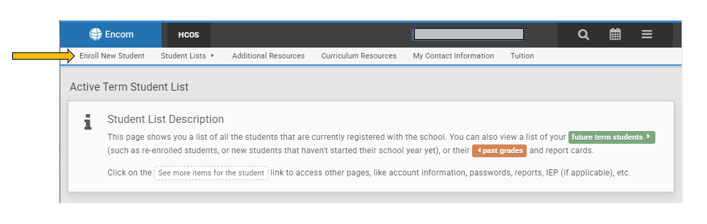
How to **enroll a new sibling** (any grade):

[![image.png](https://sophie.onlineschool.ca/uploads/images/gallery/2024-01/scaled-1680-/s5uimage.png)](https://sophie.onlineschool.ca/uploads/images/gallery/2024-01/s5uimage.png)
# Purchase Order Numbers or PO#s

#### **When you receive a Purchase Order Number (PO#):** 

Once a child is enrolled at HCOS, they will be issued a PO# once all of the required documents been received by the office.

#### **The office requires**:

- Copy of the child’s birth certificate
- Proof of Residency document (if applicable)
- Signed Curriculum agreement
- There may be additional documents required for specific students (ie. out-of-province, or IE students)
- Before funding becomes available through a Purchase Order number, families must log in to Encom and complete the [Tuition Module](https://sophie.onlineschool.ca/books/information-for-families/page/selecting-paying-tuition).
    
    (HCOS student management program) 
    - this module is visible when you first login to Encom after students are accepted into the school

#### **The PO# - used to order resources**: 

Families will receive a PO# from the HCOS office and it is accessible in a student's Encom account. The PO# is used with HCOS Vendors on their websites ([HCOS Vendors](https://onlineschool.ca/other/resources-and-curriculum/resource-vendors/ "HCOS Vendors")) or through our Curriculum and Lesson Order Forms (found under the 'Curriculum Resources' tab at the top of a student's home page in Encom. The Curriculum and Lesson Order Forms are used to order resources from non-HCOS Vendor websites and are subject to date restrictions (Lessons only after October 1st of the current school year and Curriculum orders are suspended for the month of July each year)

#### **Budget deadlines and amounts:** 

The budget for K-9 Students enrolling before September 30th of the current school year (and haven't attended any campus school during the week prior to September 30th) is as follows:

- <span style="font-weight: 400;">Parents choose to either pay an annual $200 tuition (monthly or all at once) and receive a $600 resource budget or they can pay $0 tuition and get a $350 resource budget. </span>
- The cost for HCOS online courses automatically comes out of a students annual budget.

K-9 students enrolling after the end of September pay $0 tuition and receive a $200 resource budget.  
K-9 students enrolling after the second enrollment deadline in February pay $0 tuition and don't receive a resource budget.

For K-9 families, the PO# can be used as soon as it is in Encom and it is recommended purchases be made in consultation with:

- Regional Administrator - initial contact
- HCOS Curriculum &amp; Resources Consultant - Rachael Rennie - sign up at [Rachael's Calendar](https://calendly.com/rachael-rennie-onlineschool) - <span style="text-decoration: underline;">new families</span> to HCOS prior to the assigning of an HCOS support teacher
- Current support teacher - <span style="text-decoration: underline;">returning families</span>

Students in grades 10-12 pay the following for courses (a resource budget of $50 is available for Individualized Elective Courses only):

- - **Courses 1-4**: $50 per course
    - **Courses 5-9**: $0 per course
    - **Courses 10+**: $35 per course

#### **Teacher’s Role in the PO# process:**

- Share advice on resources
- Check to see if the child has adequate resources to cover the core subjects
- Note required program related resources and materials in the SLP
- Approve resource order forms for non-HCOS Vendor purchases from websites

#### **Reimbursement for own dollars spent:** 

A parent can not be reimbursed for <span style="text-decoration: underline;">any</span> resource/lesson purchases made out of their own pocket.