It is important to note that the HCOS Finance Department is not aware of any purchases families make, using the PO system, until invoices are received by our office. Vendors have their own timeline on when they send invoices to HCOS; sometimes, it can take a few months before our department receives invoices from particular vendors. It is important families keep track of their purchases and look for the posting to be entered in ENCOM.
##### What do I do if I see I have an overage? **Overages due to course additions, computer leases, and purchases:** HCOS will begin invoicing for overages in November. Until then, a lot of movement can happen in a family's funding with courses being added, CC+ registrations being processed, and computer leases being entered, so it is best to wait until after November for the invoice. If you see the overage appear during the school year (after November) and want to pay it right away (not wait for HCOS to send the invoice), please email areid@onlineschool.ca, and Aubri can have the invoice sent to you. **If your overage is due to a CC+:** HCOS will take the full amount of funding available when we receive the registration in September/October, with any remaining amount being automatically charged to the credit card provided during registration. ##### If parents, teachers and HCOS Finance are all working together to prevent overages, how do they still occur? - Computer Leases - Computer Lease amounts are over the course of three school years. These entries are put in each year after a family re-enrolls, typically in September or October. If a family has entered into a computer lease agreement, please make sure they are accounting for this charge when they are making purchases. Families will have access to their funding in April, which means there may be 5 or 6 months where the computer lease is not deducted from their funding in ENCOM, giving them a false funding amount. - Online Courses - When a family adds a K-9 online course to their course load, a $75 fee (per course) is automatically taken from their funding. CC+ courses are also automatically taken from their funding. Before adding a course, please be sure you have the funding to cover the course(s). - There can be a significant delay when using the PO system. HCOS Finance only knows about the purchase when the vendor sends us the invoice. Some vendors invoice quarterly, meaning more than a month can go by before we received the invoice. - When making an order via the purchasing department, please know that the entry will be made in ENCOM within 5 business days from the time we receive the receipt. However, during the months of March, April, August, September, and October (when the purchasing department gets hundreds of orders each day) there can be a much longer delay, even up to two or three weeks. ##### Given the above, what are some ways families can prevent overages? - Keep a record of purchases (include date of purchase, vendor, and amount). - Check the [additional resource](https://sophie.onlineschool.ca/books/information-for-families/page/encom-budget-additional-resource-page) page in your Encom account on a regular basis. Compare your records with the entries in Encom to see if all your purchases are posted or if any are expenses yet to be entered. - Remember exchange rates apply if ordering from outside of Canada. - Take advantage of the [Learning Commons](https://sophie.onlineschool.ca/books/information-for-families/chapter/learning-commons-%28library%29 "Learning Commons") instead of purchasing new items. - If a student has a computer lease, remember the amount will be deducted from funding. - If online courses are added, make sure you take a look at your [additional resource](https://sophie.onlineschool.ca/books/information-for-families/page/encom-budget-additional-resource-page) page in Encom and ensure you have either funding to cover the cost or are okay to pay for the course out of pocket. # Encom Budget - Additional Resource Page The 'Additional Resource' page in Encom provides a variety of information that will help you track your budget during the school year. Please log in and review this page regularly, to ensure you are aware of your budget and can work within it to avoid going into an overage. ##### Additional Resource - Log into Encom - Click on the "Additional Resource" button located on the menu bar. [](https://sophie.onlineschool.ca/uploads/images/gallery/2022-02/image-1644610475978.png) This page gives you information on funding and expenses for a family as well as per student. ##### Student Summary This box will include the following information per student and is located to the left of each student's name. - [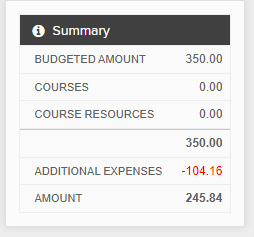](https://sophie.onlineschool.ca/uploads/images/gallery/2022-02/image-1644611271116.png) - Budgeted Amount: the amount of funding the student received - Courses: the amount of funding used that went towards courses - Course Resources: Resources that were ordered by the parent when adding an online course - Additional Expenses: the amount of funding used that went towards resources (typically these are purchases parents have made by vendors either using the purchasing department or Purchase Order system) - Amount: this is the amount of funding remaining or owing Beside the summary box you will see the "Additional Resource" box. This box will include a list of expenses or items purchased using this students purchase order number. [](https://sophie.onlineschool.ca/uploads/images/gallery/2022-02/image-1644613307208.png) - Vendor: name of the vendor - Invoice number - Description of item(s) purchases - Curriculum purchases - Non-Consumable: Need to be returned or bought out when a student leaves, as per the curriculum agreement - Consumable: Do not need to be returned or bought out when a student leaves - Lessons - Will have the Start/End date, type of lesson, Vendor's CRC Expiry date - Posted: Date the expense was posted by HCOS Finance staff - Purchased: Date on the invoice - Amount: Amount HCOS Paid ##### Group Summary This box will include the following information per family and is located at the top left hand side of the additional resource page [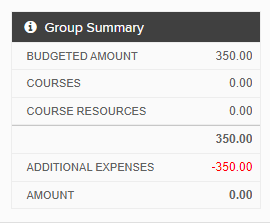](https://sophie.onlineschool.ca/uploads/images/gallery/2022-02/image-1644613510698.png) - Budgeted Amount: the combined amount of funding the family received - Courses: the combined amount of funding the family used that went towards courses - Course Resources: Resources that were ordered by the parent when adding an online course - Additional Expenses: the combined amount of funding used that went towards resources (typically these are purchases parents have made by vendors either using the purchasing department or Purchase Order system) - Amount: this is the combined family amount of funding remaining or owing # How does funding work for students in Grade 10, 11 & 12? Information on Grad funding can be found here: [Grad Program Funding](https://sophie.onlineschool.ca/books/information-for-families/page/grad-program-funding "Grad Program Funding") # Purchasing Forms ##### HCOS forms used by families to purchase curriculum and/or lessons using their Encom funding.This is for Encom funding **ONLY**, please contact the Special Education department if you are needing to make a purchase using Special Education funding or set up a lesson provider.
##### 1. Curriculum Order Form - use this form to purchase items from a vendor who is not an HCOS approved vendor. Go to the [Vendors page](https://onlineschool.ca/other/resources-and-curriculum/resource-vendors/) on the HCOS website to see if the vendor is on the approved vendor list. If the vendor is listed and does accept POs, follow the instructions given to make the purchase. If the vendor is not on the list, you will need to use the Curriculum Order Form. Links for this processes: Information on how to make the order: [Where to find the Curriculum and Recreational Program Order Forms and how to fill them out?](https://sophie.onlineschool.ca/books/information-for-families/page/where-to-find-the-curriculum-and-recreational-program-order-forms-and-how-to-fill-them-out "Where to find the Curriculum and Recreational Program Order Forms and how to fill them out?") Link to the form: [Curriculum Order Form](https://onlineschool.ca/curriculum-order-form/ "Curriculum Order Form") ##### 2. Recreational Program Form If the lesson or activity provider will not send HCOS an invoice and requires payment via credit card or if the lesson is through a City, District or Municipality recreation center you will need to use the [Recreational Program Order Form](https://onlineschool.ca/lesson-order-form/ "Recreational Program Order Form") Links for this processes: Information on how to make the order: [Where to find the Curriculum and Recreational Program Order Forms and how to fill them out?](https://sophie.onlineschool.ca/books/information-for-families/page/where-to-find-the-curriculum-and-recreational-program-order-forms-and-how-to-fill-them-out "Where to find the Curriculum and Recreational Program Order Forms and how to fill them out?") Information on Lessons: [Where to start when making a lesson or activity purchase?](https://sophie.onlineschool.ca/books/information-for-families/page/where-to-start-when-making-a-lesson-or-activity-purchase "Where to start when making a lesson or activity purchase?") Link to the form: [Recreational Program Order Form](https://onlineschool.ca/lesson-order-form/ "Recreational Program Order Form")Please read the above links as with lesson and activity purchases, there are a few more steps that need to occur prior to arranging lessons.
##### 3. HCOS Lesson Invoice Submission Form If the lesson or activity provider will accept HCOS POs and will invoice HCOS, they will need to use this form to submit their invoices. They should already have access to this form as before offering lessons to HCOS students they will need to go through the Criminal Record Check process as well as sign the [Lesson Provider Agreement](https://onlineschool.ca/fileadmin/Onlineschool.ca/user_upload/downloads/lesson_providers/Lesson_Provider_Agreement.pdf "Lesson Provider Agreement"). Information on Lessons: [Where to start when making a lesson or activity purchase?](https://sophie.onlineschool.ca/books/information-for-families/page/where-to-start-when-making-a-lesson-or-activity-purchase "Where to start when making a lesson or activity purchase?") Link to the form: [HCOS - Lesson Invoice Submission Form](https://forms.kccnet.ca/view.php?id=408448)Please read the above links as with lesson and activity purchases, there are a few more steps that need to occur prior to arranging lessons.
##### 4. Computer/iPad Lease Form If you are interested in purchasing a computer or iPad and using your curriculum funding over the course of three years, please fill out this form: [Computer/iPad Lease Form](https://forms.kccnet.ca/view.php?id=107037 "Computer/iPad Lease Form") # Resource Vendor Directory Please see the Resource Vendor Directory page for a list of vendors: [Resource Vendor Directory](https://sophie.onlineschool.ca/books/information-for-families/page/resource-vendor-directory "Resource Vendor Directory") # What can I spend my funding on?**Currently, we are unable to offer AI subscriptions due to the nature of the accounts provided by the companies and ongoing discussions about the use of AI by students at HCOS. We are actively exploring potential options to manage AI subscriptions.**
##### **Resources and Programs provided by HCOS (Internal)** - HCOS [Learning Camps](https://learninggroups.ca/ "Learning Camps") - HCOS [Community Connections](https://learninggroups.ca/ "Community Connections") - HCOS [Learning Group Co-ops](https://learninggroups.ca/ "Learning Group Co-ops") - HCOS [Computer/iPad lease](https://forms.kccnet.ca/view.php?id=107037 "Computer/iPad lease") - HCOS [K-9 Online Courses](https://sophie.onlineschool.ca/books/information-for-families/page/additional-fees-for-grade-5-9-courses) - HCOS Grad Courses - HCOS [Travel & Outreach Programs](https://grad.onlineschool.ca/resources/travel-and-outreach-programs "Travel & Outreach Programs") ##### **Resources and Programs by 3rd Party providers (External to HCOS)** - Classes, activities & lessons that are not part of HCOS - Lesson provider must Criminal Record Check on file prior to the first lesson - Educational subscriptions; providing HCOS can - Make a one-time payment (no auto renewals) - Be sure the credit card does not get saved to the account - Activity books, workbooks, flash cards, educational games, lego, building blocks, etc... - Kits - Curriculum bundles - PDF's & digital items - Educational Memberships, such as Science World, Aquarium, Art Museums, etc... - Recreational memberships, such as passes to a recreational center - Art Supplies - Printer ink and printer paper - Textbooks - DVDs - Physical books and novels - Headphones (max $100.00) - Apps, providing - They offer a gift option - They do not automatically install on the device used to make the purchase **Allowable Equipment:** - Eligible “equipment” over $100 needs to have an [Equipment Agreement](https://drive.google.com/file/d/1yLB-O1MT5Nr9RtOcPrDwyT645er3wPMI/view "Equipment Agreement") signed by the parent (if under $100 it does NOT need an agreement). Please follow the appropriate submission process based on your purchase method: 1. **Purchase Order (PO):** Email the completed form toCurrently, we are unable to offer AI subscriptions due to the nature of the accounts provided by the companies and ongoing discussions about the use of AI by students at HCOS. We are actively exploring potential options to manage AI subscriptions.
| Musical Instruments | Ministry considers this a family expense; HCOS can pay for lessons, but not instruments |
| General school supplies | Ministry considers this a family expense. Examples: notebooks, lined paper, pencils, pens, erasers, rulers, scissors, calculators, pencil sharpeners (including electric pencil sharpeners), daily planners, blackboards & whiteboards, etc... |
| Computer Accessories | Ministry considers this a family expense. Examples: adapters, USB, external storage, DVD drives, speakers, microphones, keyboards, mouse, etc... |
| Video games | HCOS considers this a family expense. Examples: Nintendo switch games, PS4 games, Xbox games etc... |
| Equipment & Costumes needed for activities and lessons | Ministry considers this a family expense; HCOS can pay for lessons, but not equipment or costumes. Examples: household appliances, workshop tools/equipment, sports equipment, greenhouse equipment, incubators, etc... |
| Cameras, microscopes & telescopes | Available on loan from [HCOS Learning Commons](https://hcslearningcommons.org/ "HCOS Learning Commons") |
| Rentals & Deposits | Ministry considers this a family expense |
| Furniture | Ministry considers this a family expense. Examples: desks, chairs, carpets, lamps, shelves, blackboards & whiteboards, etc... |
| Duty | HCOS considers this a family expense |
| Tuition | Ministry considers this a family expense; Funding cannot be used to pay tuition |
| Summer Activities | HCOS does not pay for summer programming, day camps, trips, lessons or activities. |
All purchases require approval from the teacher. If unclear about an item, please contact your teacher or the office for clarity *before* making the purchase.
# Where to find the Curriculum and Recreational Program Order Forms and how to fill them out? The first step is to go to the [Vendors page](https://onlineschool.ca/other/resources-and-curriculum/resource-vendors/) on the HCOS website to see if the vendor is on the Vendors Accepting HCOS PO Numbers list. Vendors on this list **do** **not** require a curriculum order form as you can contact them directly to make your curriculum purchase. If the vendor is not on that list, the next step is to sign into Encom where an option on the tool bar called Curriculum Resources is available. Click this link to fill out an order form for Curriculum purchases whose vendor will **not** accept an HCOS PO number. 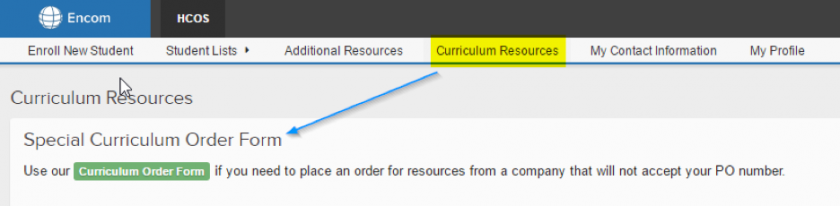 Click on the  to start a curriculum order on the order form. Each form submission allows a family to order up to 10 items from a single vendor. The template will not allow more, but there is a note section on the order form to indicate if the order will be continued on another form.If purchases will be made from a variety of vendors, **each vendor will require a different order form.**
When the “I’m Done!” box is clicked, a prompt will appear asking for the Support Teacher’s email address. (*For those who may not have a teacher as yet, please use the email address of the Regional Administrator who accepted your application to HCOS.*)If your child is enrolled in the Crew program, please include their Crew Course teacher's email, as they are responsible for verifying this request.
**Please do not try to enter a password .. that is for teacher use only.** A link to the order form will then go to the Support Teacher indicated who will verify the order before purchases can be made. Verification includes making sure that that item/lesson is in the Student Learning Plan (SLP), that there is sufficient funding for the purchase and that there is an equipment agreement or CRC, if necessary. 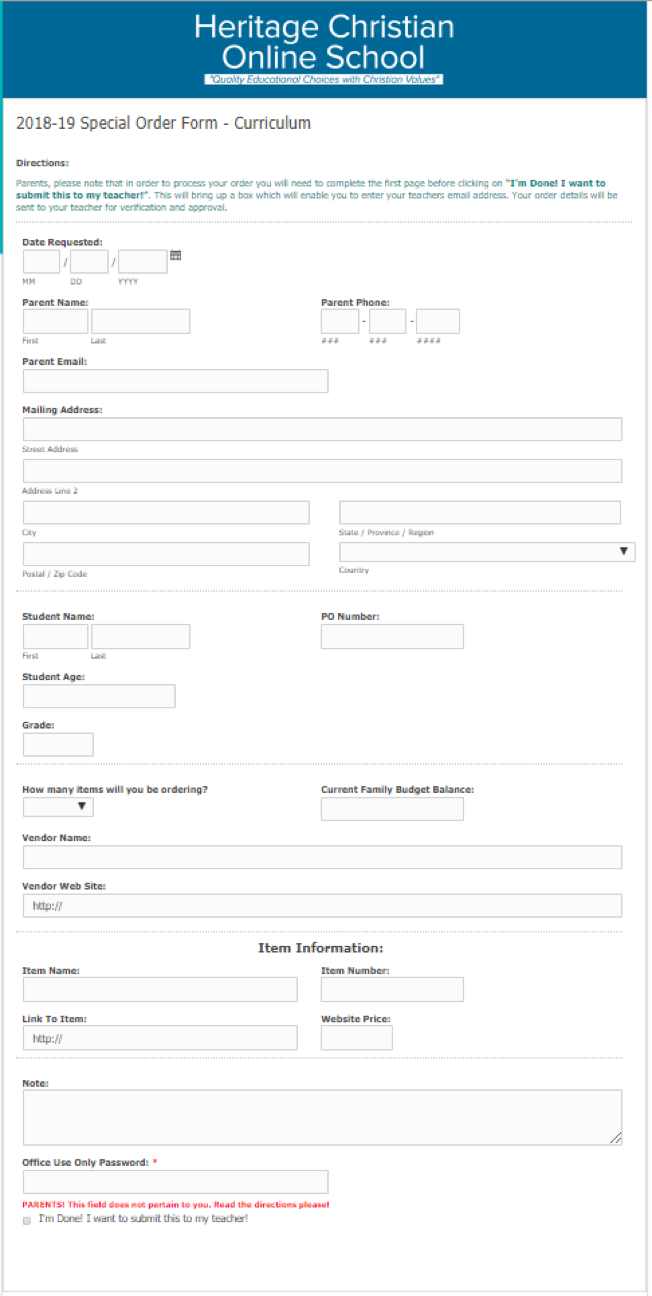 Once the Support Teacher has verified the order form, an email similar to the one below will be generated and sent to the family, which indicates the order has been approved and gone through to the purchasing department: 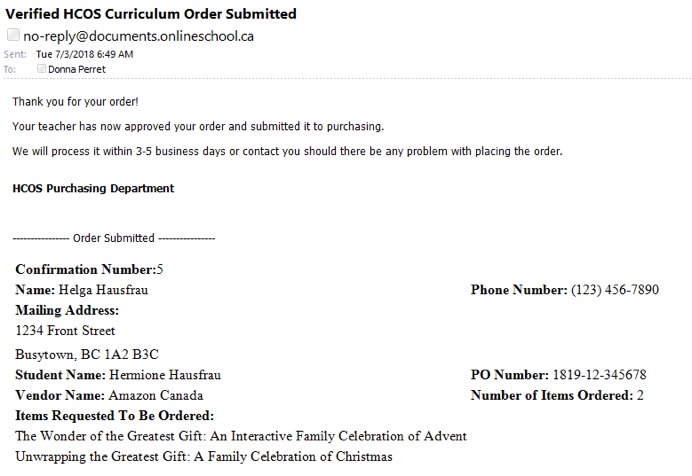 OR .. an email like the one following which indicates that the Support Teacher cannot approve the items requested. If the following email is received, the family should get in touch with the Support Teacher to discover the reason. 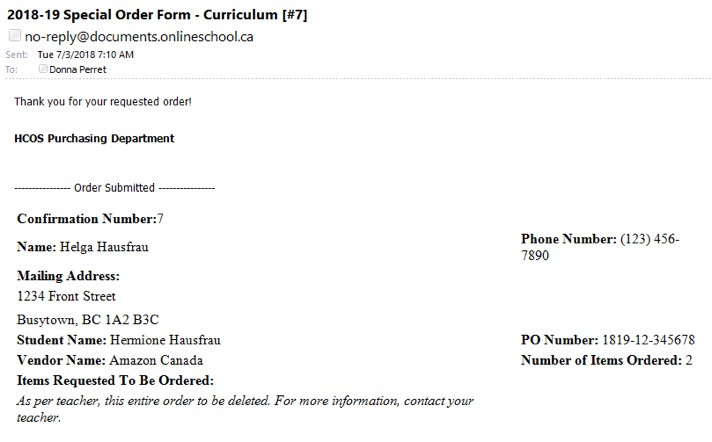 Upon receipt of the verified order form, the purchasing department will either make the purchase within 3 – 5 days of receiving it or will be in touch with the family to work out any complications with the order.As per HCOS policy, lessons will not be available for purchase until October. Close to the time that funding is released for lesson purchases, a link to the lessons order form will be made available alongside the Curriculum order form in Encom.
For further information about purchasing, please contact the purchasing office. Purchasing Office Phone: (250) 862-2376 Toll Free 1 (877) 862-2375 Email Albana Nicka, Lead Purchaser:All lesson providers must supply copies of their Criminal Record Check (CRC) policy before payment can be made. CRC policies need to be in compliance with Ministry guidelines.
The recreational program order form will only be for those vendors who will not third party invoice HCOS and require credit card payment (exception: City and Municipality Recreational Centers which **must** use the recreational program order form).
For further information, contact the purchasing office: Email Albana Nicka, Lead Purchaser:Parents who order from US vendors to Canada are personally responsible for any customs or brokerages fees.
Parents **CANNOT** ship to a US address, even with cheaper postage, as HCOS, as the legal owner of the curriculum, would be liable for brokerage and customs fees.
Please note the following curriculum vendors who have specific and unique instructions listed below
Please note: As per the Ministry of Education, HCOS cannot reimburse families for any reason. Please do not make purchases using your personal funds with the intent of HCOS reimbursing you.
| **Name of Vendor** | **Unique Instructions** |
| Teachers Pay Teachers | List the items you want on the [curriculum order form](https://hcos.ca/curriculum-order). The purchasing department will then purchase a gift card to cover those items and send you the gift card. Once you have used the gift card, the receipt from the purchase needs to be forwarded to |
| Abeka Curriculum | **\* Please Note:** Due to difficulties connecting with customer service and the inability to ship directly to a families (when we use our HCOS account), HCOS can no longer purchase Abeka Curriculum directly from Abeka. If a family requires Abeka curriculum, they can fill out a [curriculum order form](https://hcos.ca/curriculum-order "curriculum order form") and purchase the items from [Christianbook.com](https://www.christianbook.com/). The purchasing department will place the order and make payment for that. |
| Abeka Academy | **\* Please Note:** The purchase must be set up in the parent’s Abeka account, with parents choosing the 10-month payment plan. Once the order is placed, the parent will need to add ALBANA NICKA as a contact person to their account (teacher), then email their Abeka account login information along with their Abeka sales order number to the purchasing department. The purchasing department will then go into the parent account and pay the amount available for the year. The parent will then pay the remaining portion of the payment. A specific amount is set up each year as the max that will go toward Abeka Academy depending upon the exchange rate at the beginning of the school year. |
| Homeschool Buyer's Co-op | There are a number of vendors whose curriculum is at a lower price through the HSBC. Orders for those vendors are placed on the curriculum order form. Here is the link to the various vendors who give discounts: [Homeschool Buyers Club](https://homeschoolbuyersclub.com/) In order for us to make these purchases, the parent must have a Homeschool Buyer’s Co-op account and include the email they use to set up that account in the note section of the curriculum order form. |
Please Note: HCOS does not begin accepting and/or paying invoices for lessons and activities until October 1st of the school year.
**HCOS is not able to pay for any item (curriculum) or lesson that has been previously paid for by the family. HCOS does not reimburse providers, who in turn reimburse families. We can only pay an unpaid invoice.**
##### **Step One: Determine if the Lesson or Activity Provider has a Criminal Record Check (CRC) on file with HCOS** - Making a purchase for a lesson or activity begins by contacting the HCOS office to determine whether or not a lesson provider has a CRC on file with HCOS - HCOS Office: Contact Information Local: 250-862-2376 Toll Free: 1-877-862-2375All lesson and activity providers, must have a CRC on file with HCOS prior to lessons begin, in order for HCOS to process payment
##### **Step Two: Determine how the Lesson or Activity provider needs to be paid** **There are two payment options:** **Payment Option One - Purchase Order/ Invoice:** Most Lesson and Activity providers (music lessons, sports associations, choir, gymnastics, dance, etc...) will invoice HCOS and get paid via cheque. This is the preferred process for the lesson providers as well as HCOS. *All* lesson and activity invoices must be submitted via the new HCOS Lesson Invoice Submission form. HCOS will no longer be accepting lesson invoices via email. 1. \*New Lesson Providers will now send their invoices directly to the HCOS Payable department via the [HCOS - Lesson Invoice Submission](https://forms.kccnet.ca/view.php?id=408448 "HCOS - Lesson Invoice Submission") form - Their submission will never be blocked by our servers (thinking it is spam) - Their submission will be processed quicker - Reduced back and form between the HCOS finance office and Lesson Providers - All information needed to successfully process will be available to the finance office - Will go directly to the person processing Lesson and Activity invoices Important things to know regarding Lesson and Activity purchases and invoicing: 1. HCOS will accept invoices in October for lessons occurring until the end of January (Term One) 2. HCOS will accept invoices at the end of January for lessons occurring Feb - the end of June (Term Two) 3. If a Lesson or Activity Provider does not have an invoice, a template has been provided that they can use on the [HCOS - Lesson Invoice Submission](https://forms.kccnet.ca/view.php?id=408448 "HCOS - Lesson Invoice Submission") formLesson and Activity providers are given a [Lesson Provider Agreement](https://forms.kccnet.ca/view.php?id=544344 "Lesson Provider Agreement") to sign during the CRC process. This document outlines how to invoice HCOS successfully.
**Payment Option Two - Recreational Program Online Form:** This form is for all City and Municipality Recreational Center purchases (all City Rec center purchases MUST go through this form; do not ask them to invoice HCOS). **City and Municipality Recreational Centers** - Families will need to set up an online registration account with the recreational center they are wanting to purchase from - Families will then need to complete the [Recreational Program Online Form ](https://onlineschool.ca/lesson-order-form/ "Recreational Program Online Form ")found in ENCOM - If unsure of how to fill out the Recreational Program Order form, please click [here](https://onlineschool.ca/new-curriculum-purchasing-procedure/ "here") for instruction - For HCOS to register the student for lessons, families *must* include the following information on the Recreational Program form - Their username as well as a temporary password to their recreational center online account - HCOS will email you once the payment is processed, letting you know you can go in and change the password to your account - A link to the specific course they are hoping to register in or the program number - the course must be accepting registrations and active for HCOS to make the purchase - if the lesson is a Homeschool program, not available online, please enter that information in the note section of the lesson order formThe Recreational Program Online form will be available October 1st - April 15th of each school year