Assessment
- Completing the Student Self-Assessment
- Foundation Skills Assessment - FSA
- Interim Grade Reports
- Parent Sign-off for Student Learning Plan (SLP) Reports
- Understanding Your Report Card
- Understanding Your Student Learning Plan (SLP)
- Learning Habits
- New Course Specific Assessment Update — November Reporting
Completing the Student Self-Assessment
The ability to self-reflect is a life skill and student self-assessment is a central element of BC's curriculum. The K-12 self-assessment tool can be accessed in each student's homepage in Encom.
To complete the survey, simply follow these steps:
1. Go to the student's Encom home page.
2. Click "See more items for the student

3. Click the Student Self-Assessment button.
4. Read through this page in Encom:
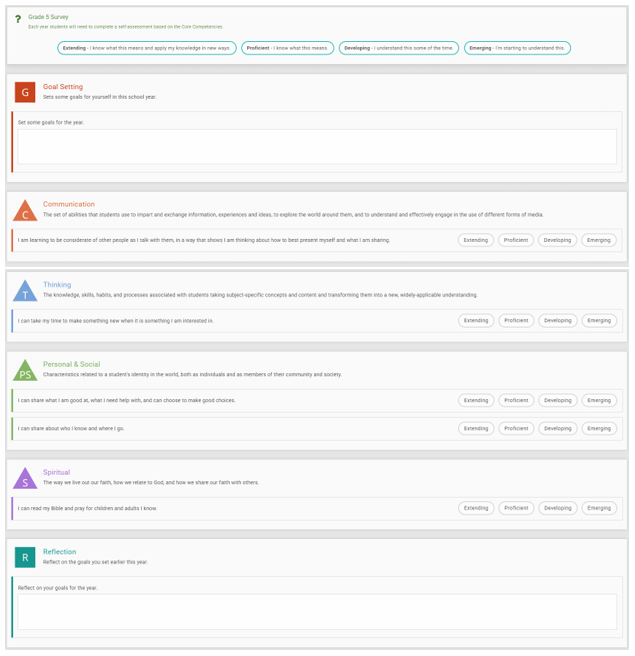
5. In the Goal section, write a goal based on something to be accomplished during the current school year.
6. From the 4 Core Competency sections (Communication, Thinking, Personal & Social, Spiritual), choose a proficiency level from the four words listed at the end of each each row that identifies level of proficiency in relation to the preceding statement:

To help with identifying what each of these levels mean, there is a short description on the top of the Student Self-Assessment:




7. Toward the end of the school year, click on the Student Self-Assessment again and complete a reflection on how well the goal listed at the start of the year has been met.
Thank you for participating in helping complete the Student Self-Assessment for each of your students.
Foundation Skills Assessment - FSA
The Foundation Skills Assessment is an annual, province-wide assessment of British Columbia students’ academic skills, and provides a snapshot of how well BC students are learning foundation skills in Literacy and Numeracy. These are assessments for students in Grades 4 and 7.
The FSA is not optional unless students meet a very narrow set of requirements for exemption.
HCOS will be administering the assessments and families receive a package in order to carry them out at home. Here is some information to help you and your child prepare for the tests.
There are two categories of assessment; the assessments in total take about four hours. Here are the categories:
- Literacy
- Numeracy
The FSA will take your child about 4 hours to complete over a few days during a four week writing period. The assessments include online and written questions and a reflection activity.
The written parts of the assessment will be marked by teachers from HCOS and the results sent to your support teacher.
The results will be based on the following proficiencies:
- Extending – Sophisticated understanding of the concepts and competencies in relation to expected learning.
- Proficient – Complete understanding of the concepts and competencies in relation to expected learning.
- Developing - Partial understanding of the concepts and competencies in relation to expected learning.
- Emerging –Initial understanding of the concepts and competencies in relation to expected learning.
FSA Questions and Answers
| What does FSA stand for? | FSA stands for Foundation Skills Assessment and this test is given to all students in BC enrolled in grades 4 and 7. |
| What subjects are tested? | The student is tested in Literacy and Numeracy. |
|
What is an invigilator?
|
An invigilator is a person responsible for supervising a test. The invigilator for the FSAs is either a teacher (in our case, with HCOS) or any person the administration deems as unbiased. This can be the parent of the child. |
|
What time is involved for each test? |
About 2 hours for each of the two sections. |
Interim Grade Reports
In addition to two formal reporting periods, Heritage Christian Online School has developed an Interim Grade Report (IGR) to ensure families are aware of any challenges or concerns regarding their child’s progress between reporting periods.
About the IGR
IGRs are an optional report designed for teachers to communicate to families any concerns that they may have with a student. For example:
- A student is performing below expectations
- A student has significantly dropped in their course progress or achievement
- There is a lack of communication with the teacher
- General concerns regarding a course grade
- If a student is in danger of failing a course
An IGR can be sent out at any point during the year; however, the natural checkpoints for teachers will be in November and April, the midway point for each term. It is possible for a student to receive more than one IGR in a school year.
IGRs will be completed on a per subject basis.
- For students in grades K-9, the support teacher may write one broad comment that addresses overall concerns in all subjects.
- For students in grades 10-12 and all course specific subjects (e.g., online, CC+), each course teacher has the option of completing an IGR.
IGRs do not replace early interventions, ongoing communication, or formative feedback provided by a teacher.
Viewing the IGR
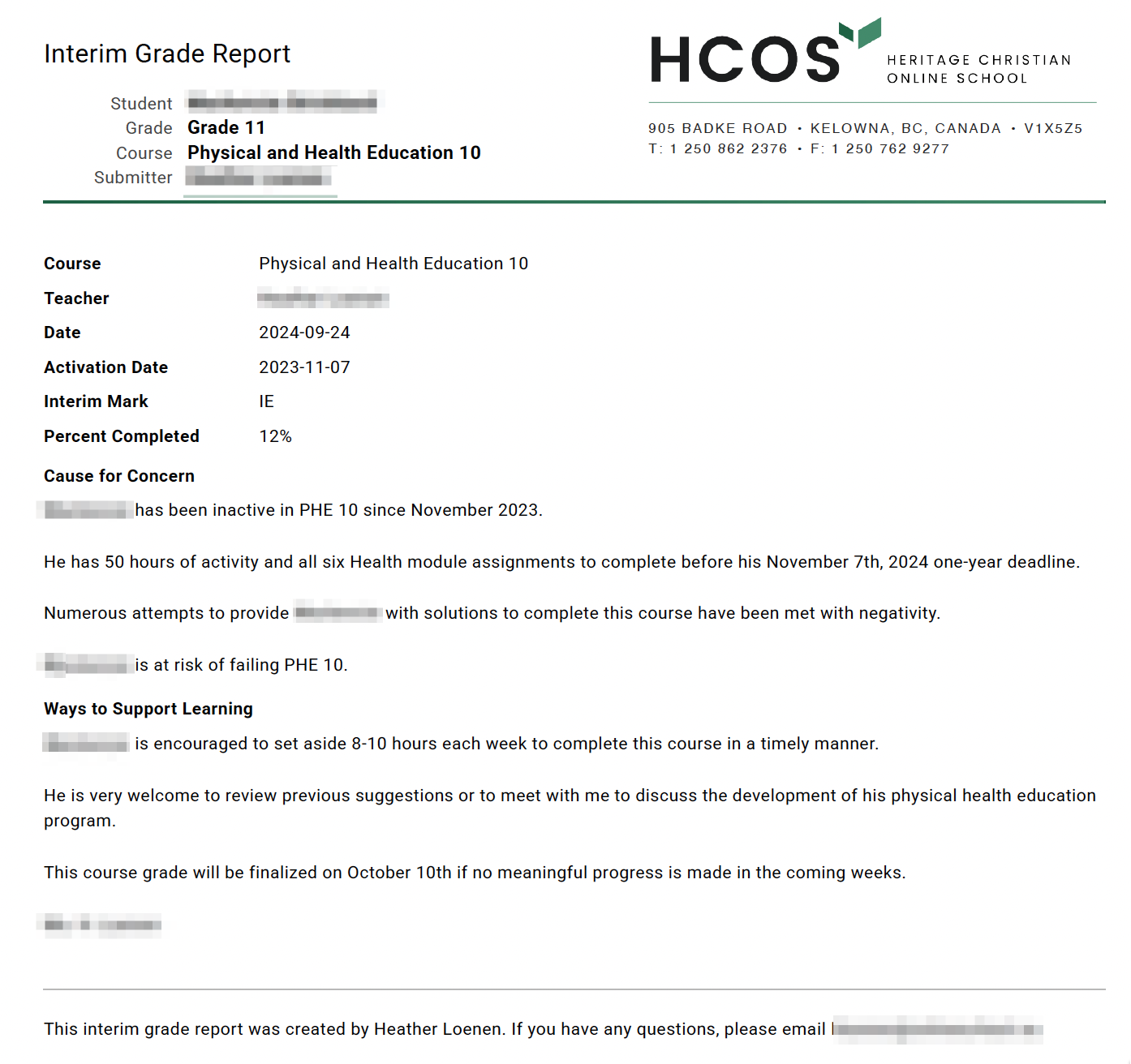
The IGR will include the course name, date submitted, teacher’s name, current interim mark, the current course completion percentage (if applicable), and two comment fields where the teacher will identify their cause for concern, and provide information on ways to support learning.
There are two ways that the IGR can be viewed.
Through email:
Or in Encom with the student’s report card:
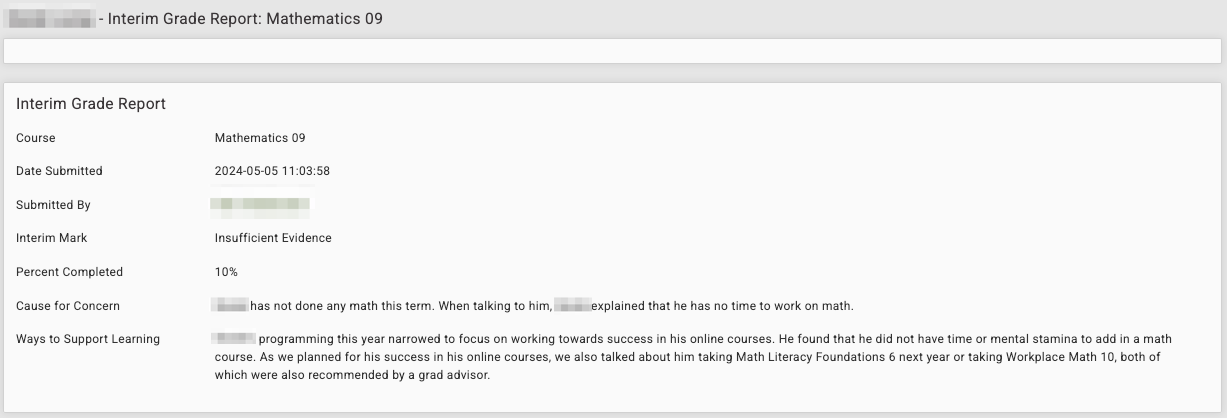
Parents will receive an email with a PDF of the IGR when a teacher creates it and can view the IGR in Encom via the Interim Grade Report Button from the student’s report card.

Parent Sign-off for Student Learning Plan (SLP) Reports
Directions for SLP Report Parent Sign-off
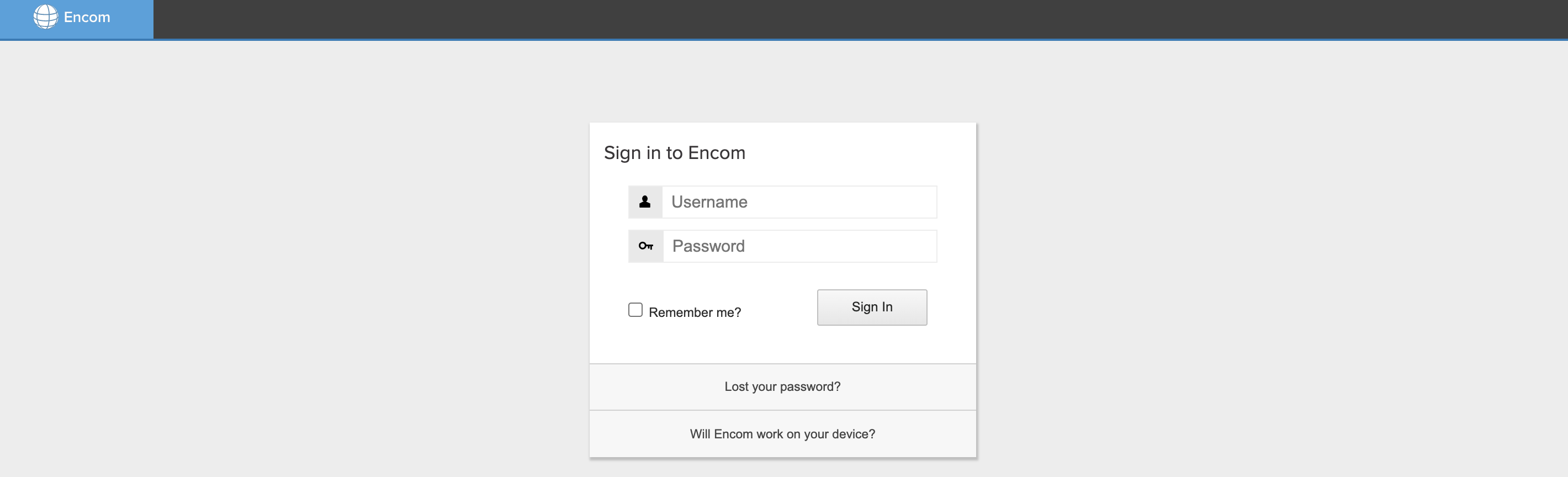
1. Log into Encom. If you have forgotten your password, please choose the "Lost your password?" option.
2. Read through your child's Student Learning Plan (SLP) Report to ensure it reflects your child's learning plan for the year. The SLP is a fluid document and should be updated throughout the school year.

3. Once you've reviewed the SLP Report, please click the SLP Parent/Guardian Sign-Off at the top of the SLP Report page.

4. To sign the SLP, begin by typing your name into the Parent/Guardian Full Name box, declaring that you collaboratively created the SLP in conjunction with your Support Teacher.
5. Next, sign your name by typing your full name into the Legal Signature box.
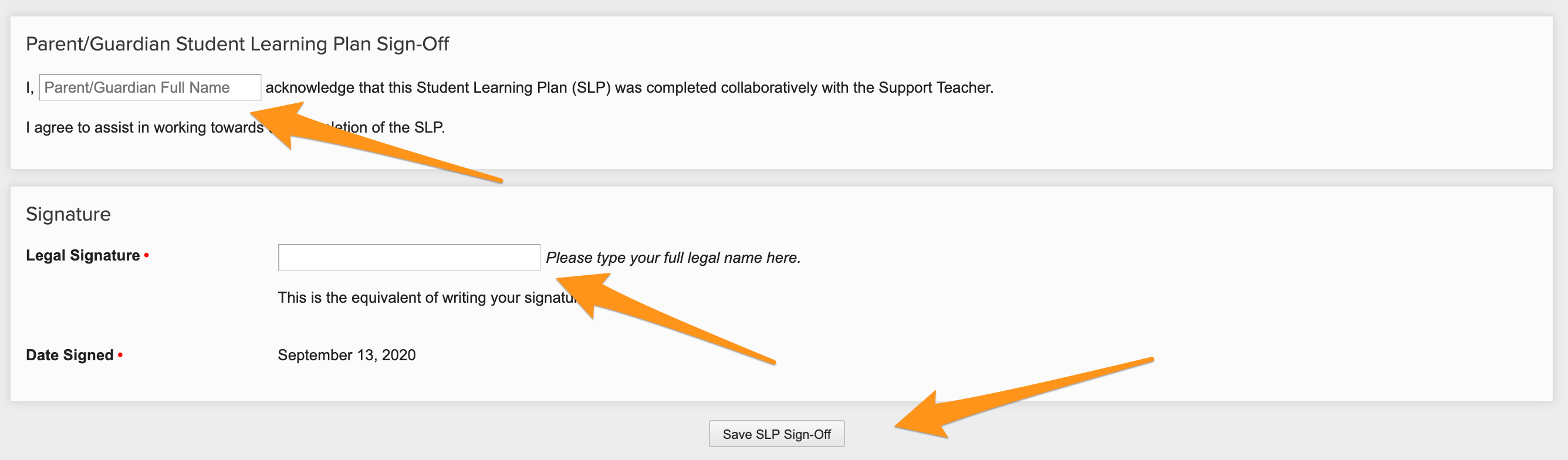
6. Before exiting the page, click Save SLP Sign-Off.
You will need to repeat this process for each child enrolled in HCOS's K-9 program.
Understanding Your Report Card
HCOS has two reporting periods for all grades, Kindergarten through Grade 12. In addition to the regular reporting terms, teachers have the option of submitting an Interim Grade Report, which will be completed if a student’s level of performance is below expectations or the teacher has cause for concern.
We have designed the report card to give a clear picture of a student’s progress and learning. A list of the student's courses will appear connected with the teacher’s assessment based on the learning standards.
Grades will be reported using the following scales:
- Grades K-9 will receive a report using proficiency scales.
- Grades 10-12 will receive percentage grades.
- Students in synchronous course offerings (online or face-to-face) will see a legend for Learning Habits.



Report Card Comments
K-9
We want to ensure parents receive easy-to-read and informative comments regarding student progress. To accomplish this, we have created a system to ensure consistent, high quality comments from teachers that give parents and guardians the bigger picture, help identify areas of struggle and provide insight into your student’s success at school. The comments will focus on the following five areas:
Students will receive a grade for every subject. Online Courses and Community Connections Plus courses will receive subject-specific comments twice a year.
Grades 5-12
Students will receive subject-specific comments twice a year. Comments will focus on proficiency level or grade level with reflections on aspects of the student’s learning that can be celebrated and suggestions as to how the student should focus their time moving forward into the next term or year.
If students do not complete their course within a school year, the open course(s) will be brought forward to the next school year’s report card and teachers will continue to report twice yearly, or until a final grade is assigned.
It is our hope that the report card will provide parents and guardians with a more accurate and concise reflection on how their student is doing at school.
Understanding Your Student Learning Plan (SLP)
At HCOS, it is our goal to develop learning plans for our students that are specific to each student's needs and abilities. These plans are for all subjects for a full school year and are worked on collaboratively between the Support Teacher and parent. Each Student Learning Plan is adaptable as student needs, interests, lessons, activities, and resources can change as a student works through their courses. With an open and flexible approach to how we build a student's yearly plan, the SLP captures the individual nature of each student and a new SLP is written for each school year.
The SLP is made up of the following information:
- Overarching Goals - One Biblical Attribute goal, one Learner Profile goal, and one Core Competency goal.
- Subject Goals - For at least three subjects, what do you want your child to accomplish or understand?
- Big Ideas - The overarching concepts of each subject.
- Instructional Format and Resources -What activities and resources are you planning to use? Share with your teacher plans and ideas you have for different subjects.
- Evaluation/Assessment - How will we check to see if your student has grown in their abilities? This is where your support teacher will evaluate/assess the work you send in.
Information your Support Teacher will collaborate with you to build:
- A list of the resources you plan to use during the current school year.
- A list of the additional activities in which you hope to enroll your child, such as music lessons, swimming, 4-H, etc. (These can be paid with your resource budget if they are in your SLP).
- A list of topics you plan on covering for Science and Social Studies. Often families with more than one child do these subjects together. If you are not planning on covering the topics for your child’s current year, let the teacher know if you have already covered the topic or at what future date you plan to cover it.
Your Teacher:
- Will work with you to build the SLP, sharing ideas and incorporating your input.
- Will post the SLP on Encom where you can review it. Be sure to tell your Support Teacher of any changes you would like to make and ask them any questions that you have.
- Will make suggestions regarding learning standards, resources, pacing, strategies and assessment.
Note: The SLP is a living document. This means that it should be reviewed by both the teacher and the parent throughout the year to ensure that it is current, and still reflects the education that is happening in your home.
Once the SLP is completed, parents are expected to sign off on it in Encom. This indicates that the parent has participated in planning of the SLP. LINK: How to sign off on SLPs
Understanding Your Student Learning Plan (SLP)
K-9 Individualized
During a home visit, the teacher and parents/guardians will collaborate to set goals aligned to the student's learning styles and interests, while also meeting the requirements set by the Ministry of Education. These goals will encompass personal goals related to the HCOS Biblical Attributes and Learner Profile, the BC curriculum Core Competencies, and subject-specific goals as appropriate. The intent is to create goals to address the student as a whole rather than having a goal for every subject, so the result should be a lower quantity, but a higher quality, of goals. The course-specific part of the SLP will revolve around resources and activities that will be used to meet student goals, along with an outline of how the teacher will assess each course.
10-12 Individualized
Course-specific SLPs will be created within Individualized courses for students in the Grad Program. The intent is to create goals that address the student in the particular learning for that course, and to outline the necessary components needed in order to receive credit toward a Dogwood Diploma.
K-12
The SLP includes a section identifying the First Peoples Principles of Learning. The BC curriculum encourages learners to understand and respect their own and other cultural heritages. Teachers will select a few of the seven principles that naturally fit the student's educational journey and align with the values and perspectives of each family. We respect family choices, and recognize that this section will look different for each of our families.
Learning Habits
Students in synchronous, face-to-face and blended courses will receive assessment on Learning Habits at the end of each reporting period. The legend appears at the top of the report card page:


Students will receive assessment in Learning Habits in one of the following categories:
- G - Good
- S - Satisfactory
- N - Needs Improvement
The Learning Habits assessment will be displayed beside the proficiency level or percentage for each synchronous, face-to-face and blended course.
A learning habit of G - Good or S - Satisfactory will not have an additional comment.
A learning habit of N - Needs Improvement will have an additional comment. The comment will appear beside the term comment and will describe ways to improve learning habits in one or more of the following areas:
- Class attendance
- Behaviour during class and what actions specifically need improvement
- Attitude during class
- Class progress

Learning Habits comments do not replace early interventions, ongoing communication, or formative feedback provided by a teacher.
New Course Specific Assessment Update — November Reporting
Schools are required to formally report on your child's progress three times a year. For individualized courses, the SLP (Student Learning Plan) Report meets this requirement.
For online, hybrid, and synchronous courses, we will issue a Course Specific Assessment Update each November . This gives you clear, current information on your child's progress in each of these courses delivered through Brightspace.
Key Dates
|
Milestone |
Date |
|
Cut-off for your child to submit course work to be reflected in this update |
9:00am the Monday prior to the release, usually the third week of November. |
|
Families notified by email that grades/assessment are ready to view |
Friday of the release week. |
Where to Find Grades and Assessment
After you receive the notification, your child's up-to-date grades and assessment comments will be available in Brightspace, under each course. You can access them by logging in and viewing the gradebook. To do so please follow the instructions here.
Questions
If you have questions about your child's progress in a specific course, please contact their teacher directly.